<?xml version="1.0" encoding="utf-8"?><feed xmlns="http://www.w3.org/2005/Atom" ><generator uri="https://jekyllrb.com/" version="3.10.0">Jekyll</generator><link href="https://peterdev.pl/feed/index.xml" rel="self" type="application/atom+xml" /><link href="https://peterdev.pl/" rel="alternate" type="text/html" /><updated>2025-02-07T16:52:00+00:00</updated><id>https://peterdev.pl/feed/index.xml</id><title type="html">Piotr Horzycki - Java and PHP developer’s blog</title><subtitle>Software engineer since 2008. Experienced with complex systems for payments, media, advertising and education. Been a scrum master and a team leader. I love fintech, data processing and SQL optimization. Sometimes I talk at meetups.</subtitle><entry><title type="html">8 Programming Myths That Impede Your Career</title><link href="https://peterdev.pl/programming-myths-that-impede-software-development-career/" rel="alternate" type="text/html" title="8 Programming Myths That Impede Your Career" /><published>2022-04-18T11:00:00+00:00</published><updated>2022-04-18T11:00:00+00:00</updated><id>https://peterdev.pl/programming-myths</id><content type="html" xml:base="https://peterdev.pl/programming-myths-that-impede-software-development-career/"><![CDATA[<p>During 14 years of my software development career, I’ve seen - and was a victim of - numerous myths and fads of the IT industry. Common beliefs and misconceptions often impeded my career because I wasted energy on activities that did not bring the expected benefits.</p>

<p>Here’s my guide on how to avoid fighting for a lost cause as a software developer.</p>

<h2 id="we-must-have-scrum">We must have Scrum</h2>

<p>Most companies have management issues, and once a software developer experiences problems, they believe there must be a clever solution. Some silver bullet, some magic pill to end all pain.</p>

<p>Scrum is often depicted as such a magic wand, but a struggle to adopt it may become even more frustrating than the initial problems. We think that Scrum is a perfect solution, so we assume that it’s all our fault that we can’t get it work.</p>

<p>Leading people is a lot more than telling them what to do. Building an organization’s culture is a lot more than setting up Jira.</p>

<p>Although Scrum is a <a href="https://scrumguides.org/index.html">“lightweight framework”</a>, it still imposes rules that some organizations will be unable to adhere to:</p>
<ol>
  <li>We work in constant timeframes (“sprints”) and try not to interrupt that work.</li>
  <li>We have meetings (daily, review, planning, retro) in constant time and place.</li>
</ol>

<p>If the company does not respect these two rules, Scrum won’t work. However, there are so many other things you can do to improve the management culture:</p>
<ul>
  <li>Establish a better feedback loop with business people. You need to know each other’s problems. You need to know how your technical solutions perform in real life. They need to know what it takes to build an IT system.</li>
  <li>Discuss business priorities. Inform your client that you can’t do everything at once. Explain that multitasking causes bad performance.</li>
  <li>Introduce high quality standards in your team. Static code analysis, tests, CI/CD, any kinds of automation.</li>
  <li>Insist on transparency and good communication.</li>
  <li>Integrate your team. Go out with them, have fun, get to know each other.</li>
</ul>

<h2 id="100-code-coverage">100% code coverage</h2>

<p>Code coverage is a metric that defines a percentage of lines of code executed during tests. It is a common belief that higher test coverage means better quality.</p>

<p>How about this example:</p>

<div class="language-java highlighter-rouge"><div class="highlight"><pre class="highlight"><code><span class="kd">class</span> <span class="nc">CalculatorTest</span> <span class="o">{</span>
  <span class="nd">@Test</span>
  <span class="kt">void</span> <span class="nf">shouldPerformAddition</span><span class="o">()</span> <span class="o">{</span>
    <span class="kt">int</span> <span class="n">result</span> <span class="o">=</span> <span class="n">calculator</span><span class="o">.</span><span class="na">add</span><span class="o">(</span><span class="mi">2</span><span class="o">,</span> <span class="mi">2</span><span class="o">);</span>
    
    <span class="n">assertTrue</span><span class="o">(</span><span class="kc">true</span><span class="o">);</span>
  <span class="o">}</span>
<span class="o">}</span>
</code></pre></div></div>

<p>This test verifies only the fact that the code has been executed without errors. But there is so much more to do! We need to check the logic, verify calculations, find edge cases.</p>

<p>In general, the more complex is the code, the more test cases you should have. A single line of code may be covered by multiple tests.</p>

<p>If your team aims only at the highest line coverage possible, it might:</p>
<ul>
  <li>give you a false sense of safety while in fact, the tests may pass serious bugs, and</li>
  <li>encourage people to write phony assertions just to boost the overall metric.</li>
</ul>

<p>A great tool to measure quality of tests is <em>mutational testing.</em> Programs like <a href="https://pitest.org/">PITest</a> or <a href="https://infection.github.io/">InfectionPHP</a> generate different versions of your production code, for example by altering conditions, removing lines, and so on. If tests do not fail despite these changes, it means they don’t catch enough bugs (mutants). Usually these problems get fixed by writing more precise test cases.</p>

<h2 id="rewrite-is-necessary">Rewrite is necessary</h2>

<p>Developers love greenfield projects because they treat them as playgrounds to try all the fancy techniques, tools and frameworks they crave for.</p>

<p>While maintaining an old and messy project, there’s usually a temptation to rewrite it from scratch. “This time we’ll do it better,” everyone thinks. This is rarely the truth.</p>

<p>Apart from obvious technical circumstances, like <a href="https://www.adobe.com/products/flashplayer/end-of-life.html">Adobe Flash being retired</a>, a rewrite causes more harm than good. Martin Fowler in his book <a href="https://martinfowler.com/books/refactoring.html">“Refactoring”</a> tells a story of a software project gone down because of a fatal attempt to rewrite everything. The project was late, over budget and didn’t work properly.</p>

<p>My first action when dealing with a legacy project is to write proper tests, which are often missing. I want to understand the system’s behavior, including all hidden behaviors and side effects. With a good set of unit, integration, API and E2E tests I can proceed to refactor the most annoying parts of the system. Tests make me confident that I don’t break any of the existing behaviors that users actually rely on.</p>

<p>There are other efficient strategies to deal with legacy systems that do not involve a major rewrite: <a href="https://martinfowler.com/bliki/StranglerFigApplication.html">Strangler Pattern</a>, <a href="https://deviq.com/domain-driven-design/anti-corruption-layer">Anti-Corruption Layer</a>, Facade. All of them assume that you start building new modules step by step, but still route traffic to the old code. When a new module is ready, you just switch traffic.</p>

<p>Instead of conducting a costly rewrite that takes months to complete, it’s better to improve the project step by step and have a tight feedback loop. You can release a small fix every week and see if it’s working properly and how it contributes to the overall project quality.</p>

<h2 id="sophisticated-architecture-is-cool">Sophisticated architecture is cool</h2>

<p>A lot of engineers believe that complicated things are more professional. When they master a difficult technique, they feel an urge to prove themselves and use the newly acquired skill in real life.</p>

<p>This goes along with trying to build the most flexible, dynamic and abstract system possible. As the source code is split into more and more layers of abstraction, it becomes more difficult to understand and maintain.</p>

<p>The urge to complicate software design is caused by:</p>
<ul>
  <li><strong>The fear of legacy code.</strong> Developers traumatized by old, messy codebases are trying to avoid them so hard by using fancy design patterns that they’re actually making a new mess that only looks clever on the outside.</li>
  <li><strong>The fear of change.</strong> Developers notoriously ask this question: “What if business requests a change?”. This often goes in pair with the business imposing strict deadlines. Developers try to anticipate these requests by building a “flexible” system, but the development delays because of all the crazy tricks in the code.</li>
</ul>

<p>I have two principles that help me overcome those fears: <a href="https://en.wikipedia.org/wiki/Lean_manufacturing">Just In Time</a> and <a href="https://en.wikipedia.org/wiki/KISS_principle">Keep It Simple, Stupid</a>. I don’t have to build an empire on day one. Let’s start simple.</p>

<p>There has to be a balance. Not every project requires <a href="https://martinfowler.com/bliki/CQRS.html">CQRS</a>. Not every project requires an <a href="https://en.wikipedia.org/wiki/Object%E2%80%93relational_mapping">ORM</a>. Not every project requires a ton of interfaces, abstractions, layers, providers, resolvers, adapters, or whatever fancy design pattern you love.</p>

<p>When I’m forced by business people to deliver working software fast, I always tell them: okay, I can cut corners, but the future changes will take more time. I warn them, and it’s fine. Business sometimes wants just to validate an idea, or quickly solve an issue. If you’re patient enough, they will eventually understand the technical consequences.</p>

<p>Also, remember the more sophisticated your architecture is, the more difficult it will be to onboard new developers.</p>

<h2 id="must-have-the-latest-version">Must have the latest version</h2>

<p>Most software projects depend on external libraries and tools. It can be satisfying to upgrade to all new versions available, but how can you be sure that it’s better, or at least still works?</p>

<p>Despite semantic versioning promises, and all the effort that went into Quality Assurance, even the most professional software vendors make mistakes. Even a tiny update from version 1.2.0 to 1.2.1 can introduce bugs.</p>

<p>On the other hand, regular updates are important due to security issues being discovered. It’s also cool to work on recent software and easier to attract new talents.</p>

<p>You can save yourself from trouble and make updates easier by implementing integration and E2E tests.</p>

<h2 id="must-follow-all-the-trends">Must follow all the trends</h2>

<p>The so-called <a href="https://blog.daftcode.pl/hype-driven-development-3469fc2e9b22">“Hype-Driven Development”</a> (or ironically, “Resume-Driven Development”) has many victims. There can be a strong neophyte effect after reading a popular book or attending a tech conference. People think that their workplace can be improved only by applying all the recent discoveries.</p>

<p>Somewhere between 2015 and 2018, there was a huge hype on microservices. Conference speakers claimed that we should split old monoliths into flexible microservices, just because Netflix does this. They didn’t warn about all the additional problems caused by the new approach: performance, stability, data separation, and so on. Several years later there were voices saying that <em>microservices are not for everyone</em> and you should consider a <em>modular monolith.</em></p>

<p>It’s good to know what happens in the industry, but you shouldn’t adopt every new buzzword. Carefully analyze whether the new solution fits your project and organization.</p>

<h2 id="we-dont-need-meetings">We don’t need meetings</h2>

<p>Business people focus on meeting people, talking to them, building relationships and a network. Developers love to focus on the code. They depict every meeting as an interruption, “not work.”</p>

<p>How many times did you hear a meeting being concluded with these words: “Ok, let’s go back to work.” Was that meeting not work? Of course it was, but for developers, only coding feels like “real work.” This is a mistake.</p>

<p>Developing software is a team effort, and to build a team (and a product), you have to talk to each other.</p>

<p>If you feel overwhelmed by meetings, possible solutions include:</p>
<ol>
  <li>Having a clear goal and agenda for every meeting. If you receive an invitation without these things specified, ask for details or deny.</li>
  <li>Putting all the meetings (like Scrum ceremonies) in one day. This works really well for my team.</li>
  <li>Adding “Focus time” or similar items in your calendar, so that other people know you’re busy. You have a right to go offline from time to time!</li>
  <li>Picking a moderator for every meeting. That person is responsible for making sure a meeting is effective and comfortable. It can be a Scrum Master, but doesn’t have to.</li>
  <li>Utilizing every tool possible to make communication better: webcams, <a href="https://miro.com/">Miro</a>, <a href="https://www.notion.so/">Notion</a>, <a href="https://workspace.google.com/">Google Workspace</a>. Instead of just talking, make everyone collaborate on a document, diagram, drawing.</li>
</ol>

<h2 id="business-doesnt-understand-us">Business doesn’t understand us</h2>

<p>It’s common among developers to think that the “ordinary” business people don’t understand nor appreciate how “clever” the developers are. Whether business is requesting crazy features, imposing deadlines, or just complaining about broken software - I can often hear this voice inside development teams: “oh, they don’t understand.”</p>

<p>Business people focus on getting clients and making money. Developers focus on technology. It’s important to both parties to explain difficult topics to each other. Why is the business doing all these pivots? Why are the developers talking about a rewrite again? Just talk to each other, and it will already solve a lot of problems.</p>

<p>Another important thing to do is to get out of your room and gain a wider perspective. When you put so much effort into solving a small coding problem, it can be totally insignificant from an overall company’s standpoint. Relax and focus on something that matters more.</p>]]></content><author><name></name></author><category term="management" /><category term="soft skills" /><category term="team leader" /><summary type="html"><![CDATA[Common beliefs and misconceptions can impede your software development career. Here's my guide on how to avoid fighting for a lost cause.]]></summary></entry><entry><title type="html">How to set a font in a PDF document</title><link href="https://peterdev.pl/how-to-set-a-font-in-pdf/" rel="alternate" type="text/html" title="How to set a font in a PDF document" /><published>2021-07-17T14:00:00+00:00</published><updated>2021-07-17T14:00:00+00:00</updated><id>https://peterdev.pl/how-to-set-a-font-in-pdf</id><content type="html" xml:base="https://peterdev.pl/how-to-set-a-font-in-pdf/"><![CDATA[<p>In this article, you will learn how to set <strong>custom fonts when converting HTML to PDF.</strong> We will cover several conversion tools, including <a href="https://developers.google.com/web/updates/2017/04/headless-chrome">Headless Chrome</a>, <a href="https://weasyprint.org/">WeasyPrint</a>, <a href="https://www.princexml.com/">Prince</a>, <a href="https://wkhtmltopdf.org/">wkhtmltopdf</a> and PHP libraries: <a href="https://github.com/mpdf/mpdf">mPDF</a>, <a href="https://tcpdf.org/">TCPDF</a> and <a href="https://github.com/dompdf/dompdf">Dompdf</a>.</p>

<h2 id="some-theory-about-fonts-and-text">Some theory about fonts and text</h2>

<p>Before we start, there are some terms you should familiarize with.</p>

<p>Most documents are based on text. To build a piece of text you need characters that will make letters and words.</p>

<p>A <em>character set</em> defines mappings between numeric codes and characters: letters, digits, symbols, and so on. For example, in the <a href="https://www.asciitable.com/">ASCII table</a>, the decimal number 65 represents a Latin letter A. This is an abstract representation; we still don’t know how this letter should be drawn on screen or printed.</p>

<p>An <em>encoding</em> specifies how the character codes will be represented as bytes. For ANSI this is simple: a byte value 65 (decimal) is equal to ASCII code 65, which represents capital letter A. However, if a character set exceeds 256 possible values of a single byte, we dive into the world of <em>multi-byte encodings</em>. The most popular ones are UTF-8, UTF-16, UTF-32, UCS-2 and UCS-4 for the Unicode standard.</p>

<p>A <em>font</em> is a set of <em>glyphs</em> - readable characters and other symbols that represent a character set. A font data file contains either bitmaps or vectors that make up all the character shapes.</p>

<p><strong>The first thing you need to properly render your HTML code to PDF is a character set declaration:</strong></p>

<div class="language-html highlighter-rouge"><div class="highlight"><pre class="highlight"><code><span class="nt">&lt;html&gt;</span>
  <span class="nt">&lt;head&gt;</span>
    <span class="nt">&lt;meta</span> <span class="na">charset=</span><span class="s">"utf-8"</span><span class="nt">&gt;</span>
  <span class="nt">&lt;/head&gt;</span>
  <span class="nt">&lt;body&gt;</span>
    ...
  <span class="nt">&lt;/body&gt;</span>
<span class="nt">&lt;/html&gt;</span>
</code></pre></div></div>

<p>Having these basics described, we can start using fonts and typing!</p>

<h2 id="picking-a-proper-font">Picking a proper font</h2>

<p>To use a custom font, first you have to choose one that covers <strong>all characters you need in your document or its part.</strong> This should be common sense, but sometimes we (or the client) forgets about it.</p>

<p>For example if you pick a fancy header font and your language includes non-Latin characters (accents, umlauts, ogonki, Cyrillic alphabet etc.), check if the font contains glyphs for them! Either use a website that allows testing fonts or download the font files and try them in some text editor or graphics program.</p>

<p>Usually, there are no “one-size-fits-all” solutions. Some fonts do not have an “italic” or “bold italic” versions on purpose. Some fonts contain only uppercase letters (capitals). Other fonts, like fancy handwriting-like ones, are not readable in small sizes.</p>

<h2 id="font-types-supported-by-pdf">Font types supported by PDF</h2>

<p>The most common font file formats are <a href="https://en.wikipedia.org/wiki/OpenType">OpenType</a>, <a href="https://en.wikipedia.org/wiki/TrueType">TrueType</a> and <a href="https://en.wikipedia.org/wiki/PostScript_fonts#Type_1">Type 1</a>. They differ in features and the way of describing shapes. All of them can be used in a PDF document.</p>

<p>The so-called <strong>“web fonts”</strong> are usually compressed with a <a href="https://www.w3.org/TR/WOFF2/">WOFF2 format</a> which is not supported by PDF. <a href="https://fonts.google.com/">Google Fonts</a>, a popular web font provider, fortunately offers a “Download family” feature which gives you the full TrueType archive.</p>

<p>However, if you only have a WOFF2 font file, you can still convert it to TrueType or OpenType. Either use an online tool, or the Linux terminal:</p>

<div class="language-plaintext highlighter-rouge"><div class="highlight"><pre class="highlight"><code>sudo apt install fontforge woff2
woff2_decompress font.woff2
</code></pre></div></div>

<h2 id="selecting-a-font-in-css">Selecting a font in CSS</h2>

<p>Let’s remind ourselves how to pick a font in CSS. The most basic syntax looks like this:</p>

<div class="language-css highlighter-rouge"><div class="highlight"><pre class="highlight"><code><span class="nt">body</span> <span class="p">{</span>
  <span class="nl">font-family</span><span class="p">:</span> <span class="n">Verdana</span><span class="p">,</span> <span class="n">Arial</span><span class="p">,</span> <span class="nb">sans-serif</span><span class="p">;</span>
<span class="p">}</span>
</code></pre></div></div>

<p>The example above means that we prefer the Verdana font, but in case if it’s not available we recommend substituting it either with Arial or any sans-serif font. We depend only on fonts available in a certain system. Every OS has a basic set of fonts, but you can also install your own.</p>

<p>Moreover, every PDF reader provides standard Type 1 fonts, including Times-Roman, Helvetica, Courier and Symbol.</p>

<p>You might want to use a custom font in your document without installing it globally in the operating system. In the example below, we import a font file and assign a local name <code class="language-plaintext highlighter-rouge">Lato</code>. We declare this is a normal (not italic) font of a regular weight:</p>

<div class="language-css highlighter-rouge"><div class="highlight"><pre class="highlight"><code><span class="k">@font-face</span> <span class="p">{</span>
  <span class="nl">font-family</span><span class="p">:</span> <span class="s2">'Lato'</span><span class="p">;</span>
  <span class="nl">font-style</span><span class="p">:</span> <span class="nb">normal</span><span class="p">;</span>
  <span class="nl">font-weight</span><span class="p">:</span> <span class="nb">normal</span><span class="p">;</span>
  <span class="nl">src</span><span class="p">:</span> <span class="sx">url('file:///path/to/my/project/lato.ttf')</span> <span class="n">format</span><span class="p">(</span><span class="s2">'truetype'</span><span class="p">);</span>
<span class="p">}</span>

<span class="nt">body</span> <span class="p">{</span>
  <span class="nl">font-family</span><span class="p">:</span> <span class="n">Lato</span><span class="p">;</span>
<span class="p">}</span>
</code></pre></div></div>

<blockquote>
  <p>The <code class="language-plaintext highlighter-rouge">@font-face</code> syntax works fine with any Chromium-based tools, and also WeasyPrint and Prince. Other tools make selecting a font a bit harder.</p>
</blockquote>

<h2 id="providing-a-font-to-wkhtmltopdf">Providing a font to wkhtmltopdf</h2>

<p>For security reasons, wkhtmltopdf blocks any access to remote font files. It cannot even read a font file from a local drive.</p>

<p>To pick a custom font, we will use a data URL trick. First we have to encode the font file with <a href="https://en.wikipedia.org/wiki/Base64">Base64</a>. We can use either the PHP function <code class="language-plaintext highlighter-rouge">base64_encode()</code>, the Linux console command <code class="language-plaintext highlighter-rouge">base64</code> or any Base64 encoder available online.</p>

<p>Then we copy the encoded file contents and paste into the CSS:</p>

<div class="language-css highlighter-rouge"><div class="highlight"><pre class="highlight"><code><span class="k">@font-face</span> <span class="p">{</span>
  <span class="nl">font-family</span><span class="p">:</span> <span class="s2">'CaslonItalic'</span><span class="p">;</span>
  <span class="nl">src</span><span class="p">:</span> <span class="sx">url(data:font/truetype;charset=utf-8;base64,PASTE_IT_HERE)</span> <span class="n">format</span><span class="p">(</span><span class="s1">"truetype"</span><span class="p">);</span>
<span class="p">}</span>

<span class="nt">body</span> <span class="p">{</span>
  <span class="nl">font-family</span><span class="p">:</span> <span class="n">CaslonItalic</span><span class="p">;</span>
<span class="p">}</span>
</code></pre></div></div>

<p>Because an encoded font file can be very long, it’s more convenient to move the <code class="language-plaintext highlighter-rouge">@font-face</code> declaration to a separate CSS file and then use <code class="language-plaintext highlighter-rouge">@include</code> to attach it to the main stylesheet. You can decide if you want to include that encoded file in your repository, or generate it on-demand in some build script.</p>

<h2 id="providing-a-font-to-dompdf">Providing a font to Dompdf</h2>

<p>The Dompdf PHP library has its internal font metrics engine which incorporates local caching. The mechanism is cumbersome because you have to manually register the font before using it.</p>

<blockquote>
  <p>Below, I assume that you’ve installed Dompdf with <a href="https://getcomposer.org/">Composer</a>, hence the <code class="language-plaintext highlighter-rouge">vendor</code> directory.</p>
</blockquote>

<p>This can be done with a <code class="language-plaintext highlighter-rouge">load_font.php</code> script which is available in the <a href="https://github.com/dompdf/utils">dompdf/utils</a> package. Since it would require to copy another repo to the <code class="language-plaintext highlighter-rouge">vendor/dompdf/dompdf</code> directory, I don’t really like this method.</p>

<p>Another way is to extend your PDF rendering code. During the first round, <strong>Dompdf will create cache files</strong> in the <code class="language-plaintext highlighter-rouge">vendor/dompdf/dompdf/lib/fonts</code> directory - which means your script must have <strong>write access</strong> there. Next time, those cached resources will be used to embed the font in a PDF:</p>

<div class="language-php highlighter-rouge"><div class="highlight"><pre class="highlight"><code><span class="kn">use</span> <span class="nc">Dompdf\Dompdf</span><span class="p">;</span>
<span class="kn">use</span> <span class="nc">Dompdf\Options</span><span class="p">;</span>

<span class="nv">$fontDirectory</span> <span class="o">=</span> <span class="s1">'/home/someuser/fonts'</span><span class="p">;</span>

<span class="nv">$options</span> <span class="o">=</span> <span class="k">new</span> <span class="nc">Options</span><span class="p">();</span>
<span class="nv">$options</span><span class="o">-&gt;</span><span class="nf">setChroot</span><span class="p">(</span><span class="nv">$fontDirectory</span><span class="p">);</span>

<span class="nv">$pdf</span> <span class="o">=</span> <span class="k">new</span> <span class="nc">Dompdf</span><span class="p">(</span><span class="nv">$options</span><span class="p">);</span>
<span class="nv">$pdf</span><span class="o">-&gt;</span><span class="nf">getFontMetrics</span><span class="p">()</span><span class="o">-&gt;</span><span class="nf">registerFont</span><span class="p">(</span>
    <span class="p">[</span><span class="s1">'family'</span> <span class="o">=&gt;</span> <span class="s1">'CaslonItalic'</span><span class="p">,</span> <span class="s1">'style'</span> <span class="o">=&gt;</span> <span class="s1">'italic'</span><span class="p">,</span> <span class="s1">'weight'</span> <span class="o">=&gt;</span> <span class="s1">'normal'</span><span class="p">],</span>
    <span class="nv">$fontDirectory</span> <span class="mf">.</span> <span class="s1">'/CaslonItalic.ttf'</span>
<span class="p">);</span>
<span class="nv">$pdf</span><span class="o">-&gt;</span><span class="nf">loadHtml</span><span class="p">(</span><span class="nv">$html</span><span class="p">);</span>
<span class="nv">$pdf</span><span class="o">-&gt;</span><span class="nf">render</span><span class="p">();</span>
<span class="nb">file_put_contents</span><span class="p">(</span><span class="s1">'output.pdf'</span><span class="p">,</span> <span class="nv">$pdf</span><span class="o">-&gt;</span><span class="nf">output</span><span class="p">());</span>
</code></pre></div></div>

<p>The <code class="language-plaintext highlighter-rouge">setChroot()</code> call is necessary for security purposes, so that Dompdf won’t access any system files.</p>

<p>Note that when adding a font file you must specify its corresponding style and weight.</p>

<h2 id="setting-a-custom-font-in-mpdf">Setting a custom font in mPDF</h2>

<p>mPDF has a decent documentation which explains a lot of nuances related to <a href="https://mpdf.github.io/fonts-languages/fonts-in-mpdf-7-x.html">international font handling.</a></p>

<p>To use your own font you have to register it. There is one major drawback: you have to invent a <strong>font family name that’s all lowercase and without any spaces</strong> nor other special characters. So instead of <code class="language-plaintext highlighter-rouge">font-family: 'DejaVu Sans'</code> you have to enter <code class="language-plaintext highlighter-rouge">font-family: dejavusans</code>.</p>

<p>You can register as many font directories as you need. Moreover, you’ll need a <strong>temporary directory to store font cache.</strong> By default it’s <code class="language-plaintext highlighter-rouge">vendor/mpdf/mpdf/tmp/mpdf/ttfontdata</code> (assuming you’ve installed mPDF with Composer) and your script must have write permissions for that. Fortunately you can set another cache path:</p>

<div class="language-php highlighter-rouge"><div class="highlight"><pre class="highlight"><code><span class="kn">use</span> <span class="nc">Mpdf\Config\ConfigVariables</span><span class="p">;</span>
<span class="kn">use</span> <span class="nc">Mpdf\Config\FontVariables</span><span class="p">;</span>
<span class="kn">use</span> <span class="nc">Mpdf\Mpdf</span><span class="p">;</span>

<span class="nv">$fontDirectory</span> <span class="o">=</span> <span class="s1">'/home/someuser/fonts'</span><span class="p">;</span>

<span class="nv">$defaultConfig</span> <span class="o">=</span> <span class="p">(</span><span class="k">new</span> <span class="nc">ConfigVariables</span><span class="p">())</span><span class="o">-&gt;</span><span class="nf">getDefaults</span><span class="p">();</span>
<span class="nv">$fontDirs</span> <span class="o">=</span> <span class="nv">$defaultConfig</span><span class="p">[</span><span class="s1">'fontDir'</span><span class="p">];</span>

<span class="nv">$defaultFontConfig</span> <span class="o">=</span> <span class="p">(</span><span class="k">new</span> <span class="nc">FontVariables</span><span class="p">())</span><span class="o">-&gt;</span><span class="nf">getDefaults</span><span class="p">();</span>
<span class="nv">$fontData</span> <span class="o">=</span> <span class="nv">$defaultFontConfig</span><span class="p">[</span><span class="s1">'fontdata'</span><span class="p">];</span>

<span class="nv">$mpdf</span> <span class="o">=</span> <span class="k">new</span> <span class="nc">Mpdf</span><span class="p">([</span>
    <span class="s1">'fontDir'</span> <span class="o">=&gt;</span> <span class="err">\</span><span class="nb">array_merge</span><span class="p">(</span><span class="nv">$fontDirs</span><span class="p">,</span> <span class="p">[</span>
        <span class="nv">$fontDirectory</span><span class="p">,</span>
    <span class="p">]),</span>
    <span class="s1">'fontdata'</span> <span class="o">=&gt;</span> <span class="nv">$fontData</span> <span class="o">+</span> <span class="p">[</span>
        <span class="s1">'caslon'</span> <span class="o">=&gt;</span> <span class="p">[</span>
            <span class="s1">'I'</span> <span class="o">=&gt;</span> <span class="s1">'CaslonItalic.ttf'</span><span class="p">,</span>
        <span class="p">],</span>
    <span class="p">],</span>
    <span class="s1">'tempDir'</span> <span class="o">=&gt;</span> <span class="nv">$fontDirectory</span> <span class="mf">.</span> <span class="s1">'/tmp'</span><span class="p">,</span>
<span class="p">]);</span>
<span class="nv">$mpdf</span><span class="o">-&gt;</span><span class="nf">WriteHTML</span><span class="p">(</span><span class="nv">$html</span><span class="p">);</span>
<span class="nv">$mpdf</span><span class="o">-&gt;</span><span class="nf">Output</span><span class="p">(</span><span class="s1">'output.pdf'</span><span class="p">,</span> <span class="s1">'F'</span><span class="p">);</span>
</code></pre></div></div>

<p>When registering font files, you have to declare their style with <code class="language-plaintext highlighter-rouge">R</code>, <code class="language-plaintext highlighter-rouge">B</code>, <code class="language-plaintext highlighter-rouge">I</code> and <code class="language-plaintext highlighter-rouge">BI</code> identifiers, corresponding to “regular”, “bold”, “italic” and “bold italic” styles, respectively.</p>

<h2 id="custom-fonts-in-tcpdf">Custom fonts in TCPDF</h2>

<p>TCPDF follows a similar font registration pattern to the previous two libraries. You can do it in two ways - either in the command line, or directly in PHP code.</p>

<p>Thanks to the command line you can embed the conversion commands in some Continuous Delivery pipeline that builds your application. Instead of committing the temporary font files, you can rebuild them every time with a simple command like this (assuming you’re using Composer):</p>

<div class="language-plaintext highlighter-rouge"><div class="highlight"><pre class="highlight"><code>php ./vendor/tecnickcom/tcpdf/tools/tcpdf_addfont.php -b -f 32 -o /home/someuser/fonts/tmp/ -i CaslonItalic.ttf
</code></pre></div></div>

<p>If you don’t use the command line, you can still do the same conversion thing in PHP using the <code class="language-plaintext highlighter-rouge">TCPDF_FONTS</code> class:</p>

<div class="language-php highlighter-rouge"><div class="highlight"><pre class="highlight"><code><span class="nv">$fontDirectory</span> <span class="o">=</span> <span class="s1">'/home/someuser/fonts/'</span><span class="p">;</span>

<span class="c1">// The trailing slash is mandatory here</span>
<span class="nv">$tempDirectory</span> <span class="o">=</span> <span class="nv">$fontDirectory</span> <span class="mf">.</span> <span class="s1">'tmp/'</span><span class="p">;</span>

<span class="nv">$fontname</span> <span class="o">=</span> <span class="no">TCPDF_FONTS</span><span class="o">::</span><span class="nf">addTTFfont</span><span class="p">(</span>
    <span class="nv">$fontDirectory</span> <span class="mf">.</span> <span class="s1">'CaslonItalic.ttf'</span><span class="p">,</span> <span class="s1">'TrueTypeUnicode'</span><span class="p">,</span> <span class="s1">''</span><span class="p">,</span> <span class="mi">32</span><span class="p">,</span> <span class="nv">$tempDirectory</span>
<span class="p">);</span>

<span class="nv">$pdf</span> <span class="o">=</span> <span class="k">new</span> <span class="nc">TCPDF</span><span class="p">(</span><span class="s1">'P'</span><span class="p">,</span> <span class="s1">'mm'</span><span class="p">,</span> <span class="s1">'LETTER'</span><span class="p">);</span>
<span class="nv">$pdf</span><span class="o">-&gt;</span><span class="nf">AddPage</span><span class="p">();</span>
<span class="nv">$pdf</span><span class="o">-&gt;</span><span class="nf">AddFont</span><span class="p">(</span><span class="nv">$fontname</span><span class="p">,</span> <span class="s1">'I'</span><span class="p">,</span> <span class="nv">$tempDirectory</span> <span class="mf">.</span> <span class="nv">$fontname</span> <span class="mf">.</span> <span class="s1">'.php'</span><span class="p">);</span>
<span class="nv">$pdf</span><span class="o">-&gt;</span><span class="nf">writeHTML</span><span class="p">(</span><span class="nv">$html</span><span class="p">);</span>
<span class="nb">file_put_contents</span><span class="p">(</span><span class="s1">'output.pdf'</span><span class="p">,</span> <span class="nv">$pdf</span><span class="o">-&gt;</span><span class="nf">Output</span><span class="p">(</span><span class="s1">''</span><span class="p">,</span> <span class="s1">'S'</span><span class="p">));</span>
</code></pre></div></div>

<p>The <code class="language-plaintext highlighter-rouge">addTTFfont()</code> method parses the original font file and creates three temporary files in the directory of your choice. Obviously, the script must have write access to that path. The return value holds a font file name which is usually a lowercase string. With <code class="language-plaintext highlighter-rouge">AddFont()</code> method you register the PHP font definition file created earlier.</p>

<p>Now you can use the font inside the document like this (remember about the lowercase font family name):</p>

<div class="language-css highlighter-rouge"><div class="highlight"><pre class="highlight"><code><span class="nt">body</span> <span class="p">{</span>
  <span class="nl">font-family</span><span class="p">:</span> <span class="s2">'caslon'</span><span class="p">;</span>
  <span class="nl">font-size</span><span class="p">:</span> <span class="m">72pt</span><span class="p">;</span>
  <span class="nl">font-style</span><span class="p">:</span> <span class="nb">italic</span><span class="p">;</span>
<span class="p">}</span>
</code></pre></div></div>

<p>Instead of using CSS, you can also set the current font with PHP:</p>

<div class="language-php highlighter-rouge"><div class="highlight"><pre class="highlight"><code><span class="nv">$pdf</span><span class="o">-&gt;</span><span class="nf">SetFont</span><span class="p">(</span><span class="nv">$fontname</span><span class="p">,</span> <span class="s1">'I'</span><span class="p">,</span> <span class="mi">72</span><span class="p">);</span>
</code></pre></div></div>

<p>The mysterious number 32 which appears both in the command line call and the <code class="language-plaintext highlighter-rouge">addTTFfont()</code> method is the <em>font descriptor flag</em> from the PDF specification. Fixed and italic fonts are usually autodetected, but for other types you have to specify an exact flag value:</p>

<table>
  <thead>
    <tr>
      <th>Font descriptor flag</th>
      <th>Meaning</th>
    </tr>
  </thead>
  <tbody>
    <tr>
      <td>1</td>
      <td>fixed font</td>
    </tr>
    <tr>
      <td>4</td>
      <td>symbol font</td>
    </tr>
    <tr>
      <td>8</td>
      <td>script (handwriting)</td>
    </tr>
    <tr>
      <td>32</td>
      <td>non-symbol (standard) font</td>
    </tr>
    <tr>
      <td>64</td>
      <td>italic font</td>
    </tr>
    <tr>
      <td>65,536</td>
      <td>all caps (no lowercase letters)</td>
    </tr>
    <tr>
      <td>131,072</td>
      <td>small caps</td>
    </tr>
  </tbody>
</table>

<blockquote>
  <p>TCPDF does not support OpenType nor WOFF2 fonts.</p>
</blockquote>

<figure class="book-horizontal">
  <a href="https://leanpub.com/mastering-pdf-with-php">
    <img src="https://d2sofvawe08yqg.cloudfront.net/mastering-pdf-with-php/hero?1620897108" width="400" height="518" alt="Book cover" />
    <figcaption>
      <h2>My book “Mastering PDF with PHP” is out now on&nbsp;Leanpub!</h2>
      <h3>Learn how to create, read and edit PDF files in your PHP applications!</h3>
    </figcaption>
  </a>
</figure>]]></content><author><name></name></author><category term="pdf" /><category term="php" /><summary type="html"><![CDATA[How to set a font in a PDF document with TCPDF, mPDF, Dompdf, wkhtmltopdf, Chrome, WeasyPrint and Prince]]></summary></entry><entry><title type="html">How to encrypt a PDF document in PHP</title><link href="https://peterdev.pl/php-how-to-encrypt-a-pdf-document/" rel="alternate" type="text/html" title="How to encrypt a PDF document in PHP" /><published>2021-06-16T16:00:00+00:00</published><updated>2021-06-16T16:00:00+00:00</updated><id>https://peterdev.pl/php-how-to-encrypt-a-pdf-document</id><content type="html" xml:base="https://peterdev.pl/php-how-to-encrypt-a-pdf-document/"><![CDATA[<p>If your business uses <a href="https://en.wikipedia.org/wiki/PDF">Portable Document Format</a> to send private and sensitive data like bank documents, you might need to use password protection. In this article you’ll see how to encrypt PDFs with tools available for PHP.</p>

<h2 id="types-of-encryption">Types of encryption</h2>

<p>To protect document contents, an encryption algorithm has to be used. PDF supports <em>symmetric ciphers</em> which use a password specified by the document creator to build an encryption key. The person who receives the document has to enter that password in order to decrypt the document.</p>

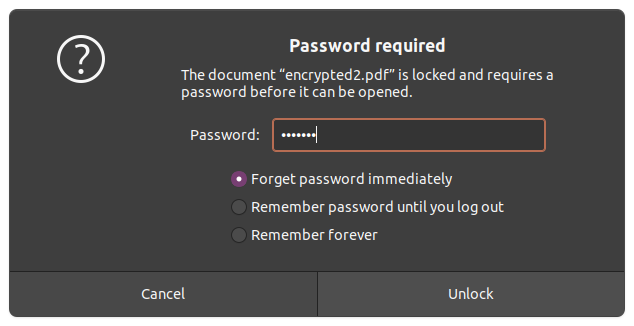
<figure>
  <img src="/assets/pdf-password-protection.png" width="634" height="326" alt="Password window in Document Viewer (Ubuntu)" />
  <figcaption>Document Viewer on Ubuntu asking for a password</figcaption>
</figure>

<p>We have two algorithms to choose from, with different key lengths. The longer the encryption key used, the harder it is to crack the code:</p>

<ol>
  <li><a href="https://en.wikipedia.org/wiki/RC4">RC4</a>. The first algorithm supported by PDF. Unfortunately it is perceived as <strong>insecure</strong> because multiple vulnerabilities were discovered. Still, it’s the only algorithm implemented by most free PDF generators. Available key lengths are <strong>40 and 128 bits.</strong></li>
  <li><a href="https://en.wikipedia.org/wiki/Advanced_Encryption_Standard">Advanced Encryption Standard</a>. This algorithm is approved even by the U.S. government to protect classifed information. There is no foreseeable possibility to crack the AES cipher in a reasonable time; with modern hardware it would take billions of years. If you receive password-protected bank documents, they’re most likely encrypted with AES. Available key lengths are <strong>128 and 256 bits.</strong></li>
</ol>

<h2 id="user-permissions">User permissions</h2>

<p>When encrypting a PDF document, you can specify two passwords. One of them is for you as the document <em>owner</em>, so you can perform any editing and printing tasks. You can also set a <em>user</em> password that gives limited access to the document.</p>

<p>You decide what privileges you give to other people. For example, you might disallow full quality prints, so that users have only a preview. You might disable editing, disassembling pages structure, filling forms, and so on.</p>

<p>It is however up to the PDF reader to enforce these rules. A hacker could implement their own reader to disobey the limitations. Once a document is decoded with a password, a reader has full access to it and can perform any operations.</p>

<p>In the examples below we will set separate owner and user password, but the latter is always optional.</p>

<h2 id="encryption-with-tcpdf">Encryption with TCPDF</h2>

<p><a href="https://tcpdf.org/">The TCPDF library</a> is the only free tool I know which supports all ciphers, including the strongest 256-bit AES. Internally, TCPDF uses PHP’s <a href="https://www.php.net/manual/en/book.openssl.php">OpenSSL</a> and <a href="https://www.php.net/manual/en/book.hash.php">Hash</a> extensions to perform encryption.</p>

<div class="language-php highlighter-rouge"><div class="highlight"><pre class="highlight"><code><span class="nv">$pdf</span> <span class="o">=</span> <span class="k">new</span> <span class="nc">TCPDF</span><span class="p">(</span><span class="s1">'P'</span><span class="p">,</span> <span class="s1">'mm'</span><span class="p">,</span> <span class="s1">'LETTER'</span><span class="p">);</span>
<span class="nv">$pdf</span><span class="o">-&gt;</span><span class="nf">SetProtection</span><span class="p">(</span>
    <span class="p">[</span><span class="s1">'print'</span><span class="p">,</span> <span class="s1">'modify'</span><span class="p">,</span> <span class="s1">'copy'</span><span class="p">,</span> <span class="s1">'annot-forms'</span><span class="p">,</span> <span class="s1">'fill-forms'</span><span class="p">,</span> <span class="s1">'extract'</span><span class="p">,</span> <span class="s1">'assemble'</span><span class="p">,</span> <span class="s1">'print-high'</span><span class="p">],</span>
    <span class="s1">'test123'</span><span class="p">,</span> <span class="s1">'test456'</span><span class="p">,</span> <span class="mi">3</span>
<span class="p">);</span>
<span class="nv">$pdf</span><span class="o">-&gt;</span><span class="nf">AddPage</span><span class="p">();</span>
<span class="nv">$pdf</span><span class="o">-&gt;</span><span class="nf">writeHTML</span><span class="p">(</span><span class="s1">'&lt;h1&gt;Hello world&lt;/h1&gt;'</span><span class="p">);</span>
<span class="nb">file_put_contents</span><span class="p">(</span><span class="s1">'output.pdf'</span><span class="p">,</span> <span class="nv">$pdf</span><span class="o">-&gt;</span><span class="nf">Output</span><span class="p">(</span><span class="s1">''</span><span class="p">,</span> <span class="s1">'S'</span><span class="p">));</span>
</code></pre></div></div>

<p>The last argument to the <code class="language-plaintext highlighter-rouge">SetProtection()</code> method is a number specifying the algorithm and key length. The numbers start with <code class="language-plaintext highlighter-rouge">0</code> for a 40-bit RC4, and end with <code class="language-plaintext highlighter-rouge">3</code> representing 256-bit AES.</p>

<p>If you put an empty array as the first argument, no permissions will be granted for document users except for displaying it on a screen.</p>

<h2 id="encryption-with-mpdf">Encryption with mPDF</h2>

<p><a href="https://github.com/mpdf/mpdf">The mPDF library</a> is better in HTML rendering than TCPDF. Unfortunately it doesn’t support such a wide range of encryption algorithms. You can only choose between 40-bit and 128-bit RC4 ciphers. The key length is specified as the fourth argument to the <code class="language-plaintext highlighter-rouge">SetProtection()</code> method below:</p>

<div class="language-php highlighter-rouge"><div class="highlight"><pre class="highlight"><code><span class="kn">use</span> <span class="nc">Mpdf\Mpdf</span><span class="p">;</span>

<span class="nv">$pdf</span> <span class="o">=</span> <span class="k">new</span> <span class="nc">Mpdf</span><span class="p">([</span><span class="s1">'format'</span> <span class="o">=&gt;</span> <span class="s1">'LETTER'</span><span class="p">,</span> <span class="s1">'orientation'</span> <span class="o">=&gt;</span> <span class="s1">'P'</span><span class="p">]);</span>
<span class="nv">$pdf</span><span class="o">-&gt;</span><span class="nf">SetProtection</span><span class="p">(</span>
    <span class="p">[</span><span class="s1">'print'</span><span class="p">,</span> <span class="s1">'modify'</span><span class="p">,</span> <span class="s1">'copy'</span><span class="p">,</span> <span class="s1">'annot-forms'</span><span class="p">,</span> <span class="s1">'fill-forms'</span><span class="p">,</span> <span class="s1">'extract'</span><span class="p">,</span> <span class="s1">'assemble'</span><span class="p">,</span> <span class="s1">'print-highres'</span><span class="p">],</span>
    <span class="s1">'test123'</span><span class="p">,</span> <span class="s1">'test456'</span><span class="p">,</span> <span class="mi">128</span>
<span class="p">);</span>
<span class="nv">$pdf</span><span class="o">-&gt;</span><span class="nf">writeHTML</span><span class="p">(</span><span class="s1">'&lt;h1&gt;Hello world&lt;/h1&gt;'</span><span class="p">);</span>
<span class="nv">$pdf</span><span class="o">-&gt;</span><span class="nf">Output</span><span class="p">(</span><span class="s1">'output.pdf'</span><span class="p">,</span> <span class="s1">'F'</span><span class="p">);</span>
</code></pre></div></div>

<h2 id="encryption-with-dompdf">Encryption with Dompdf</h2>

<p><a href="https://github.com/dompdf/dompdf">The Dompdf library</a> is quite good at rendering HTML and CSS code into a PDF. When it comes to encryption, it supports only the weak 40-bit RC4 cipher:</p>

<div class="language-php highlighter-rouge"><div class="highlight"><pre class="highlight"><code><span class="kn">use</span> <span class="nc">Dompdf\Dompdf</span><span class="p">;</span>

<span class="nv">$pdf</span> <span class="o">=</span> <span class="k">new</span> <span class="nc">Dompdf</span><span class="p">();</span>
<span class="nv">$pdf</span><span class="o">-&gt;</span><span class="nf">getCanvas</span><span class="p">()</span>
    <span class="o">-&gt;</span><span class="nf">get_cpdf</span><span class="p">()</span>
    <span class="o">-&gt;</span><span class="nf">setEncryption</span><span class="p">(</span><span class="s1">'test123'</span><span class="p">,</span> <span class="s1">'test456'</span><span class="p">,</span> <span class="p">[</span><span class="s1">'print'</span><span class="p">,</span> <span class="s1">'modify'</span><span class="p">,</span> <span class="s1">'copy'</span><span class="p">,</span> <span class="s1">'add'</span><span class="p">]);</span>
<span class="nv">$pdf</span><span class="o">-&gt;</span><span class="nf">loadHtml</span><span class="p">(</span><span class="nv">$html</span><span class="p">);</span>
<span class="nv">$pdf</span><span class="o">-&gt;</span><span class="nf">render</span><span class="p">();</span>
<span class="nb">file_put_contents</span><span class="p">(</span><span class="s1">'output.pdf'</span><span class="p">,</span> <span class="nv">$pdf</span><span class="o">-&gt;</span><span class="nf">output</span><span class="p">());</span>
</code></pre></div></div>

<p>Also, Dompdf supports only basic four permissions from an older PDF standard.</p>

<h2 id="encryption-with-fpdf">Encryption with FPDF</h2>

<p><a href="http://www.fpdf.org/">The FPDF library</a> does not have built-in encryption, but there’s a separate <a href="http://www.fpdf.org/en/script/script37.php">code snippet to implement 40-bit RC4.</a></p>

<p>Setasign offers a <a href="https://www.setasign.com/products/setapdf-core/details">commercial library that supports encryption up to 256-bit AES.</a></p>

<h2 id="encrypting-an-existing-file-with-command-line-tools">Encrypting an existing file with command line tools</h2>

<p>If your favorite PDF generator does not offer encryption, you can use <a href="https://www.pdflabs.com/tools/pdftk-server/">PDFtk Server</a> to encrypt an existing file with 128-bit RC4. PDFtk does not support AES.</p>

<p>With PDFtk, protecting a file is as simple as running the command below in your terminal:</p>

<div class="language-plaintext highlighter-rouge"><div class="highlight"><pre class="highlight"><code>pdftk input.pdf output encrypted.pdf owner_pw test123 user_pw test456
</code></pre></div></div>

<p>To use AES, you need to pick a commercial tool, for example <a href="https://www.coherentpdf.com/cpdfmanual/cpdfmanualch4.html#x7-350004">Coherent PDF.</a></p>

<h2 id="summary">Summary</h2>

<p>Document encryption is a good way to protect the document contents from being accessed by an unauthorized person. Banking documents are often sent via email and they could be stolen from a person’s account. With strong encryption, it’s not possible to read them.</p>

<figure class="book-horizontal">
  <a href="https://leanpub.com/mastering-pdf-with-php">
    <img src="https://d2sofvawe08yqg.cloudfront.net/mastering-pdf-with-php/hero?1620897108" width="400" height="518" alt="Book cover" />
    <figcaption>
      <h2>My book “Mastering PDF with PHP” is out now on&nbsp;Leanpub!</h2>
      <h3>Learn how to create, read and edit PDF files in your PHP applications!</h3>
    </figcaption>
  </a>
</figure>]]></content><author><name></name></author><category term="pdf" /><category term="php" /><category term="security" /><summary type="html"><![CDATA[Examples of encrypting a document with TCPDF, mPDF, Dompdf and PDFtk]]></summary></entry><entry><title type="html">Executing shell commands from a PHP script</title><link href="https://peterdev.pl/execute-a-shell-command-in-php/" rel="alternate" type="text/html" title="Executing shell commands from a PHP script" /><published>2021-04-02T19:00:00+00:00</published><updated>2021-04-02T19:00:00+00:00</updated><id>https://peterdev.pl/execute-a-shell-command-in-php</id><content type="html" xml:base="https://peterdev.pl/execute-a-shell-command-in-php/"><![CDATA[<p>If you need to call an external program from your PHP script, for example to create a PDF file or convert images, there are several ways to do that.</p>

<p>I strongly recommend using the <a href="https://symfony.com/doc/current/components/process.html">Symfony Process Component</a>. It wraps around native PHP functions like <code class="language-plaintext highlighter-rouge">proc_open()</code> and it provides <strong>extra level of security</strong>. It is also very convenient because of an <strong>object-oriented interface</strong>. Take a look at this example:</p>

<div class="language-php highlighter-rouge"><div class="highlight"><pre class="highlight"><code><span class="kn">use</span> <span class="nc">Symfony\Component\Process\Exception\ProcessFailedException</span><span class="p">;</span>
<span class="kn">use</span> <span class="nc">Symfony\Component\Process\Process</span><span class="p">;</span>

<span class="c1">// call the wkhtmltopdf program with two arguments; specify input and output</span>
<span class="nv">$process</span> <span class="o">=</span> <span class="k">new</span> <span class="nc">Process</span><span class="p">([</span><span class="s1">'wkhtmltopdf'</span><span class="p">,</span> <span class="s1">'-'</span><span class="p">,</span> <span class="s1">'-'</span><span class="p">]);</span>

<span class="c1">// send something to the command's input</span>
<span class="nv">$process</span><span class="o">-&gt;</span><span class="nf">setInput</span><span class="p">(</span><span class="nv">$html</span><span class="p">);</span>

<span class="k">try</span> <span class="p">{</span>
    <span class="c1">// wait for process execution</span>
    <span class="nv">$process</span><span class="o">-&gt;</span><span class="nf">mustRun</span><span class="p">();</span>

    <span class="c1">// get output from the command</span>
    <span class="nv">$pdf</span> <span class="o">=</span> <span class="nv">$process</span><span class="o">-&gt;</span><span class="nf">getOutput</span><span class="p">();</span>
<span class="p">}</span> <span class="k">catch</span> <span class="p">(</span><span class="nc">ProcessFailedException</span> <span class="nv">$exception</span><span class="p">)</span> <span class="p">{</span>
    <span class="k">echo</span> <span class="nv">$exception</span><span class="o">-&gt;</span><span class="nf">getMessage</span><span class="p">();</span>
<span class="p">}</span>
</code></pre></div></div>

<p>Most guides around the web will simply tell you about functions like <code class="language-plaintext highlighter-rouge">exec()</code>, but that’s not how you should do it. You can either end up with security issues in your application, or just lack features.</p>

<p>This has been a short introduction. If you have more time to read, let me show you <strong>all the details</strong> of calling an external process from a PHP script.</p>

<h2 id="input-output-and-exit-codes">Input, output and exit codes</h2>

<p>A program running under an operating system is a <em>process</em>. This is the word we are going to use. We can run processes for example by entering <em>commands</em> inside a terminal.</p>

<p>A command usually consists of the program file name followed optionally by a set of arguments. Every program expects different arguments, and if we don’t know them, we simply ask the program for help:</p>

<div class="language-plaintext highlighter-rouge"><div class="highlight"><pre class="highlight"><code>ls --help
</code></pre></div></div>

<p><img src="/assets/unix-process-diagram.svg" alt="Processes accept several inputs and can produce multiple outputs" /></p>

<p><strong>A process has several connectors to the surrounding environment.</strong> It’s using them to transfer data over <em>streams</em>.</p>

<p>A stream is just a sequence of bytes. There are three default streams in a terminal:</p>
<ul>
  <li>standard input (STDIN), connected to the keyboard</li>
  <li>standard output (STDOUT), connected to the screen</li>
  <li>standard error output (STDERR), either displayed on the screen or written to a log file</li>
</ul>

<p>Using streams gives us great flexibility. Instead of operating on a real console or real files in PHP, we can <strong>send a string variable to a process</strong> and then <strong>read the output into another variable</strong>. We don’t need to remember to delete a file. This will help a lot for example with PDF conversions.</p>

<p>When calling processes that operate on files by default, sometimes a hyphen (<code class="language-plaintext highlighter-rouge">-</code>) is used in place of a file name argument to indicate that the process should read from STDIN instead, or write to STDOUT instead of a real file.</p>

<p>Additional input to a process consists of <em>environment variables</em>. These can be some user-specific data stored in their home directories, or variables provided at the process startup. They make the arguments list shorter because we don’t have to specify common settings on every command call. Perhaps the most known environment variable is <code class="language-plaintext highlighter-rouge">PATH</code> which stores a list of directories where commands are searched.</p>

<p>A process can also return a special code - <em>exit code</em> - which indicates success or failure. The convention is to use 0 in case of success and any other code from 1 to 255 to show a different situation.</p>

<p>You can connect several processes in a chain using the <em>pipe</em> operator. This means that the output of the first process is tied to the input of the second process, and so on. Such mechanism is commonly used in terminals, for example to paginate long output:</p>

<div class="language-plaintext highlighter-rouge"><div class="highlight"><pre class="highlight"><code>ls -al | less
</code></pre></div></div>

<p>In the example above, the output of the <code class="language-plaintext highlighter-rouge">ls</code> command was sent to the <code class="language-plaintext highlighter-rouge">less</code> command. If the <code class="language-plaintext highlighter-rouge">ls</code> failed, the chain would break and the second command would not be called.</p>

<p>By default, we have to wait until each process terminates. This means our PHP script will also be paused when executing an external command. If you add an ampersand (<code class="language-plaintext highlighter-rouge">&amp;</code>) at the end of the command, the command will run independently. It won’t block your script and will last even after the script stops. You might need this especially when launching lengthy processes like generating a 100-page report.</p>

<p>It’s good to have some control over such a background action. Fortunately, every process receives an identifier after being opened. The process identifier (PID) can be used later for example to check if the process is still running or to shut it down.</p>

<p>Now that we have the general rules covered, we can switch to the PHP world.</p>

<h2 id="basic-execution-from-a-php-script">Basic execution from a PHP script</h2>

<p>There are four (!) PHP functions which purpose is to <a href="https://www.php.net/manual/en/ref.exec.php">run an external command and return output</a>:</p>

<ul>
  <li><code class="language-plaintext highlighter-rouge">exec()</code> accepts command as input and returns the last line from the result of the command. Optionally, it can fill a provided array with every line of the output and also assign the return code to the variable. On failure, the function returns <code class="language-plaintext highlighter-rouge">false</code>.</li>
  <li><code class="language-plaintext highlighter-rouge">passthru()</code> executes a command and passes the raw output directly to the browser. The PHP documentation recommends it in case if <em>binary</em> output has to be sent without interference.</li>
  <li><code class="language-plaintext highlighter-rouge">shell_exec()</code> executes a command and returns the complete output as a string. It does not provide the exit code. The function return value is confusing because it can be <code class="language-plaintext highlighter-rouge">null</code> both if an error occured or if the command produced no output.</li>
  <li><code class="language-plaintext highlighter-rouge">system()</code> acts like <code class="language-plaintext highlighter-rouge">passthru()</code>, but it also returns the last line of the output. This function works well only with <em>text</em> output.</li>
</ul>

<p>To confuse you even more, PHP has a <a href="https://www.php.net/manual/en/language.operators.execution.php">backtick operator</a> which works just like <code class="language-plaintext highlighter-rouge">shell_exec()</code>:</p>

<div class="language-php highlighter-rouge"><div class="highlight"><pre class="highlight"><code><span class="nv">$output</span> <span class="o">=</span> <span class="sb">`ls -al`</span><span class="p">;</span>
</code></pre></div></div>

<p><strong>I don’t use <em>any</em> of these functions because none of them provides full control over streams.</strong></p>

<h2 id="escaping-arguments">Escaping arguments</h2>

<p>Sometimes the full command is made from several parts, for example a file name coming from a user. <strong>We have to filter such input data properly</strong> to make sure it does not contain any unescaped special characters like spaces, quotes, backticks, slashes, and so on. They could either break the command or cause security issues.</p>

<p>An attacker could inject any other command and perhaps access protected data:</p>

<div class="language-php highlighter-rouge"><div class="highlight"><pre class="highlight"><code><span class="c1">// this is terribly unsafe</span>
<span class="nb">system</span><span class="p">(</span><span class="s1">'touch '</span> <span class="mf">.</span> <span class="nv">$_POST</span><span class="p">[</span><span class="s1">'filename'</span><span class="p">]);</span>

<span class="cm">/*
 * $_POST['filename'] could be equal to something like:
 *   a || cat /etc/passwd
 * so the full command would become:
 *   touch a || cat /etc/passwd
 * which would reveal the contents of a protected file.
 */</span>
</code></pre></div></div>

<p>Every command argument should be filtered by the <code class="language-plaintext highlighter-rouge">escapeshellarg()</code> function. This will ensure that your input data will be properly treated as a single safe argument:</p>

<div class="language-php highlighter-rouge"><div class="highlight"><pre class="highlight"><code><span class="c1">// this is safer, but still ugly</span>
<span class="nb">system</span><span class="p">(</span><span class="s1">'touch '</span> <span class="mf">.</span> <span class="nb">escapeshellarg</span><span class="p">(</span><span class="nv">$_POST</span><span class="p">[</span><span class="s1">'filename'</span><span class="p">]));</span>
</code></pre></div></div>

<p>Of course the <code class="language-plaintext highlighter-rouge">filename</code> parameter should be further filtered to make sure an attacker cannot access any other directories outside the current one:</p>

<div class="language-php highlighter-rouge"><div class="highlight"><pre class="highlight"><code><span class="c1">// this is safe assuming we are in a special directory for uploaded content</span>
<span class="nb">system</span><span class="p">(</span><span class="s1">'touch '</span> <span class="mf">.</span> <span class="nb">escapeshellarg</span><span class="p">(</span><span class="nb">basename</span><span class="p">(</span><span class="nv">$_POST</span><span class="p">[</span><span class="s1">'filename'</span><span class="p">])));</span>
</code></pre></div></div>

<h2 id="opening-and-controlling-a-process">Opening and controlling a process</h2>

<p>The <code class="language-plaintext highlighter-rouge">proc_open()</code> function provides the most possibilities to control a process execution. Its usage requires a lot more code than the one-liners mentioned earlier, but it pays off.</p>

<p>Here’s an example of calling a <code class="language-plaintext highlighter-rouge">wkhtmltopdf</code> program which converts an input HTML document to a PDF. We’ll supply the HTML contents to STDIN and read the output from STDOUT:</p>

<div class="language-php highlighter-rouge"><div class="highlight"><pre class="highlight"><code><span class="nv">$html</span> <span class="o">=</span> <span class="s1">'&lt;html&gt;&lt;body&gt;Test&lt;/body&gt;&lt;/html&gt;'</span><span class="p">;</span>

<span class="nv">$descriptors</span> <span class="o">=</span> <span class="p">[</span>
    <span class="mi">0</span> <span class="o">=&gt;</span> <span class="p">[</span><span class="s1">'pipe'</span><span class="p">,</span> <span class="s1">'r'</span><span class="p">],</span>  <span class="c1">// we will write to stdin</span>
    <span class="mi">1</span> <span class="o">=&gt;</span> <span class="p">[</span><span class="s1">'pipe'</span><span class="p">,</span> <span class="s1">'w'</span><span class="p">],</span>  <span class="c1">// we will read from stdout</span>
    <span class="mi">2</span> <span class="o">=&gt;</span> <span class="p">[</span><span class="s1">'pipe'</span><span class="p">,</span> <span class="s1">'w'</span><span class="p">],</span>  <span class="c1">// we will also read from stderr</span>
<span class="p">];</span>

<span class="c1">// this array will contain three pointers to all three pipes</span>
<span class="nv">$pipes</span> <span class="o">=</span> <span class="p">[];</span>

<span class="c1">// we're starting the process now</span>
<span class="nv">$process</span> <span class="o">=</span> <span class="nb">proc_open</span><span class="p">(</span><span class="s1">'wkhtmltopdf - -'</span><span class="p">,</span> <span class="nv">$descriptors</span><span class="p">,</span> <span class="nv">$pipes</span><span class="p">);</span>
<span class="k">if</span> <span class="p">(</span><span class="nb">is_resource</span><span class="p">(</span><span class="nv">$process</span><span class="p">))</span> <span class="p">{</span>
    <span class="c1">// the process has been opened, we can send input data</span>
    <span class="nb">fwrite</span><span class="p">(</span><span class="nv">$pipes</span><span class="p">[</span><span class="mi">0</span><span class="p">],</span> <span class="nv">$html</span><span class="p">);</span>

    <span class="c1">// you have to close the stream after use</span>
    <span class="nb">fclose</span><span class="p">(</span><span class="nv">$pipes</span><span class="p">[</span><span class="mi">0</span><span class="p">]);</span>

    <span class="c1">// now we're reading binary output</span>
    <span class="c1">// PHP will wait until the stream is complete</span>
    <span class="nv">$pdf</span> <span class="o">=</span> <span class="nb">stream_get_contents</span><span class="p">(</span><span class="nv">$pipes</span><span class="p">[</span><span class="mi">1</span><span class="p">]);</span>
    <span class="nb">fclose</span><span class="p">(</span><span class="nv">$pipes</span><span class="p">[</span><span class="mi">1</span><span class="p">]);</span>

    <span class="nv">$errors</span> <span class="o">=</span> <span class="nb">stream_get_contents</span><span class="p">(</span><span class="nv">$pipes</span><span class="p">[</span><span class="mi">2</span><span class="p">]);</span>
    <span class="nb">fclose</span><span class="p">(</span><span class="nv">$pipes</span><span class="p">[</span><span class="mi">2</span><span class="p">]);</span>

    <span class="c1">// all pipes must be closed now to avoid a deadlock</span>
    <span class="nv">$exitCode</span> <span class="o">=</span> <span class="nb">proc_close</span><span class="p">(</span><span class="nv">$process</span><span class="p">);</span>
<span class="p">}</span>
</code></pre></div></div>

<p>Here you can see how we invoked the <code class="language-plaintext highlighter-rouge">wkhtmltopdf</code> process and told it to operate on standard input/output streams instead of real files (notice the two hyphens). Our script was halted until the external program returned full output and terminated. If everything went fine, <code class="language-plaintext highlighter-rouge">$exitCode</code> should equal 0.</p>

<p>There are three optional arguments to <code class="language-plaintext highlighter-rouge">proc_open()</code>, in consecutive order:</p>
<ol>
  <li><code class="language-plaintext highlighter-rouge">$cwd</code> - current working directory; if not specified, the process will operate in the same directory as the current PHP process.</li>
  <li><code class="language-plaintext highlighter-rouge">$env</code> - an array of environment variables. If not provided, the child process will inherit all the environment of the PHP process.</li>
  <li><code class="language-plaintext highlighter-rouge">$other_options</code> - at the moment this can only contain Windows-specific console options. Nothing to see here.</li>
</ol>

<p>If you only need a unidirectional pipe, you can use the <code class="language-plaintext highlighter-rouge">popen()</code> function (isn’t PHP function naming confusing?). A one-way communication is easier to handle:</p>

<div class="language-php highlighter-rouge"><div class="highlight"><pre class="highlight"><code><span class="c1">// we will send HTML contents to STDIN and save PDF output to a file</span>
<span class="nv">$process</span> <span class="o">=</span> <span class="nb">popen</span><span class="p">(</span><span class="s1">'wkhtmltopdf - output.pdf'</span><span class="p">,</span> <span class="s1">'w'</span><span class="p">);</span>
<span class="nb">fwrite</span><span class="p">(</span><span class="nv">$process</span><span class="p">,</span> <span class="nv">$html</span><span class="p">);</span>
<span class="nb">pclose</span><span class="p">(</span><span class="nv">$process</span><span class="p">);</span>
</code></pre></div></div>

<h2 id="the-most-convenient-solution-the-process-component">The most convenient solution: The Process Component</h2>

<p>All the code demonstrated above looks like low-level C programming. It’s not really comfortable in the modern age of object-oriented programming and abstractions. Today you shouldn’t worry about resources, pointers and streams.</p>

<p>To include <a href="https://symfony.com/doc/current/components/process.html">the Process component</a> in your project, just use Composer in the command line:</p>

<div class="language-plaintext highlighter-rouge"><div class="highlight"><pre class="highlight"><code>composer require symfony/process
</code></pre></div></div>

<p>To remind you, the basic usage consists of just creating an instance of the <code class="language-plaintext highlighter-rouge">Process</code> class, providing input arguments and getting output:</p>

<div class="language-php highlighter-rouge"><div class="highlight"><pre class="highlight"><code><span class="kn">use</span> <span class="nc">Symfony\Component\Process\Exception\ProcessFailedException</span><span class="p">;</span>
<span class="kn">use</span> <span class="nc">Symfony\Component\Process\Process</span><span class="p">;</span>

<span class="nv">$process</span> <span class="o">=</span> <span class="k">new</span> <span class="nc">Process</span><span class="p">([</span><span class="s1">'wkhtmltopdf'</span><span class="p">,</span> <span class="s1">'-'</span><span class="p">,</span> <span class="s1">'-'</span><span class="p">]);</span>
<span class="nv">$process</span><span class="o">-&gt;</span><span class="nf">setInput</span><span class="p">(</span><span class="nv">$html</span><span class="p">);</span>

<span class="k">try</span> <span class="p">{</span>
    <span class="c1">// wait for process execution</span>
    <span class="nv">$process</span><span class="o">-&gt;</span><span class="nf">mustRun</span><span class="p">();</span>

    <span class="nv">$pdf</span> <span class="o">=</span> <span class="nv">$process</span><span class="o">-&gt;</span><span class="nf">getOutput</span><span class="p">();</span>
<span class="p">}</span> <span class="k">catch</span> <span class="p">(</span><span class="nc">ProcessFailedException</span> <span class="nv">$exception</span><span class="p">)</span> <span class="p">{</span>
    <span class="k">echo</span> <span class="nv">$exception</span><span class="o">-&gt;</span><span class="nf">getMessage</span><span class="p">();</span>
<span class="p">}</span>
</code></pre></div></div>

<p>Notice that we pass input arguments as an <em>array</em>. We no longer create a long command invocation by hand; the Process component assembles the call, taking care of <strong>proper argument escaping</strong>. Instead of exit codes, we use exceptions just like it should be done in a modern object-oriented environment.</p>

<blockquote>
  <p>An alternative to <code class="language-plaintext highlighter-rouge">$process-&gt;mustRun()</code> is just using <code class="language-plaintext highlighter-rouge">$process-&gt;run()</code> and then checking the result of <code class="language-plaintext highlighter-rouge">$process-&gt;isSuccessful()</code>.</p>
</blockquote>

<p>The process will inherit all environment variables from the PHP process running the script. You can provide additional variables (or override them) at runtime:</p>

<div class="language-php highlighter-rouge"><div class="highlight"><pre class="highlight"><code><span class="nv">$process</span> <span class="o">=</span> <span class="k">new</span> <span class="nc">Process</span><span class="p">([</span><span class="s1">'ls'</span><span class="p">,</span> <span class="s1">'-al'</span><span class="p">]);</span>
<span class="nv">$process</span><span class="o">-&gt;</span><span class="nf">run</span><span class="p">(</span><span class="kc">null</span><span class="p">,</span> <span class="p">[</span><span class="s1">'SOME_VARIABLE'</span> <span class="o">=&gt;</span> <span class="s1">'value'</span><span class="p">]);</span>
</code></pre></div></div>

<p>Refer to the documentation of the specific process you are calling to know all the input rules.</p>

<h3 id="asynchronous-and-background-processes">Asynchronous and background processes</h3>

<p>As we know, running a child process blocks the parent process by default. This is the easiest and safest behavior.</p>

<p>Some processes take considerable amount of time and it would be good to let the user know what is happening. You can provide an anonymous function which is going to receive every piece of output coming from a child process:</p>

<div class="language-php highlighter-rouge"><div class="highlight"><pre class="highlight"><code><span class="c1">// we need to receive the current unbuffered output of a process</span>
<span class="nb">ini_set</span><span class="p">(</span><span class="s1">'output_buffering'</span><span class="p">,</span> <span class="mi">0</span><span class="p">);</span>

<span class="nv">$process</span> <span class="o">=</span> <span class="k">new</span> <span class="nc">Process</span><span class="p">([</span><span class="s1">'wkhtmltopdf'</span><span class="p">,</span> <span class="s1">'-'</span><span class="p">,</span> <span class="s1">'-'</span><span class="p">]);</span>
<span class="nv">$process</span><span class="o">-&gt;</span><span class="nf">setInput</span><span class="p">(</span><span class="nv">$veryLongHtml</span><span class="p">);</span>
<span class="nv">$process</span><span class="o">-&gt;</span><span class="nf">run</span><span class="p">(</span><span class="k">function</span> <span class="p">(</span><span class="nv">$type</span><span class="p">,</span> <span class="nv">$buffer</span><span class="p">)</span> <span class="p">{</span>
    <span class="k">if</span> <span class="p">(</span><span class="nc">Process</span><span class="o">::</span><span class="no">ERR</span> <span class="o">===</span> <span class="nv">$type</span><span class="p">)</span> <span class="p">{</span>
        <span class="nv">$errorOutput</span> <span class="mf">.</span><span class="o">=</span> <span class="nv">$buffer</span><span class="p">;</span>
    <span class="p">}</span> <span class="k">else</span> <span class="p">{</span>
        <span class="nv">$mainOutput</span> <span class="mf">.</span><span class="o">=</span> <span class="nv">$buffer</span><span class="p">;</span>
    <span class="p">}</span>
<span class="p">});</span>
</code></pre></div></div>

<p>If our main script logic does not strictly depend on the complete child process execution, we can run things in parallel. While a child process does its job, we can do other things in the meantime and occassionally check on that process:</p>

<div class="language-php highlighter-rouge"><div class="highlight"><pre class="highlight"><code><span class="nv">$process</span> <span class="o">=</span> <span class="k">new</span> <span class="nc">Process</span><span class="p">[</span><span class="s1">'wkhtmltopdf'</span><span class="p">,</span> <span class="s1">'-'</span><span class="p">,</span> <span class="s1">'-'</span><span class="p">]);</span>
<span class="nv">$process</span><span class="o">-&gt;</span><span class="nf">setInput</span><span class="p">(</span><span class="nv">$veryLongHtml</span><span class="p">);</span>
<span class="nv">$process</span><span class="o">-&gt;</span><span class="nf">start</span><span class="p">();</span>
<span class="nv">$pid</span> <span class="o">=</span> <span class="nv">$process</span><span class="o">-&gt;</span><span class="nf">getPid</span><span class="p">();</span>

<span class="c1">// do some other things here...</span>

<span class="nv">$process</span><span class="o">-&gt;</span><span class="nf">wait</span><span class="p">();</span>
<span class="k">echo</span> <span class="nv">$process</span><span class="o">-&gt;</span><span class="nf">getOutput</span><span class="p">();</span>
</code></pre></div></div>

<h3 id="timeouts">Timeouts</h3>

<p>To prevent a process from hanging forever, two types of timeout mechanisms were introduced:</p>
<ul>
  <li><strong>a general timeout</strong>, measured from the process start,</li>
  <li><strong>an idle timeout</strong>, measured from the last output received from a process.</li>
</ul>

<p>By default, a process has a general timeout of 60 seconds. You can change it with the <code class="language-plaintext highlighter-rouge">setTimeout()</code> method of the <code class="language-plaintext highlighter-rouge">Process</code> class. The other clock can be adjusted with <code class="language-plaintext highlighter-rouge">setIdleTimeout()</code>.</p>

<p>When running a lengthy command asynchronously, you must use <code class="language-plaintext highlighter-rouge">checkTimeout()</code> to see if the timeout is reached.</p>

<p><strong>Remember there are plenty of other timeouts</strong> in the surrounding environment. PHP has also its own maximum script execution times - different for a web server and CLI (Command-line Interface).</p>

<blockquote>
  <p>If your child process stops unexpectedly, this might mean that you’re exceeding some timeout, either set by yourself, the PHP environment, an operating system, a database or anything else.</p>
</blockquote>

<h2 id="reporting-progress-of-time-consuming-tasks">Reporting progress of time-consuming tasks</h2>

<p>When a user requests a report, a package or any other piece of data which preparation takes more time, you should not make people stare at the loading icon forever. They will either think that their internet connection is broken, or the server went down. <strong>They might panically hit the “Refresh” button</strong>, and thus make even more trouble by causing multiple requests to start. They might even hang your server.</p>

<p>The basic solution is to add a message which says “This might take a few minutes.” However, a user might hit a browser timeout while watching that loading icon.</p>

<p><strong>It’s better to send the results in an e-mail</strong>, or make some <em>push notification</em> which says “ok, you can download your file here.” The user knows that they don’t have to wait until the process is done, they can just leave the computer for a while and come back later.</p>

<p>If the process produces a series of files, let’s say a hundred PDFs, it is fairly easy to <strong>track progress</strong>. The worker process simply has to report the number of finished items, for example by writing it to a file. Your frontend will simply read that file and render a nice progress bar. You can also track time of every item preparation to make fancy estimations about the remaining time.</p>

<p>Why not go even further and have anonymous statistics of all user requests? You can then tell users: “this usually takes 3 to 5 minutes.”</p>

<h2 id="queueing-tasks">Queueing tasks</h2>

<p><strong>Your server has limited resources.</strong> What happens if a thousand users suddenly request a freshly generated PDF document?</p>

<p>In bars, restaurants and shops, people wait in line to be served. There might be for example three people on the counter, and every one of them can serve one customer at a time.</p>

<p>Same rules apply to computing. A processor has a finite number of cores. Running more processes than the number of cores requires your processor to <strong>switch between tasks</strong>. Your PHP installation when using <a href="https://www.php.net/manual/en/install.fpm.configuration.php">FPM</a> also has some <em>pool</em> settings which defines <strong>how many requests can be handled simultaneously</strong>.</p>

<p>When you know how much tasks your system can take at once, you should enforce limits and use some queue system. It can be <a href="https://www.rabbitmq.com/">RabbitMQ</a> or <a href="https://kafka.apache.org/">Kafka</a>, for example. These are battle-tested tools which are going to control your queues. I’m not covering them in this book.</p>

<p>Having a queue means that your user will have even more waiting time. You should take this into account when informing users about estimated delivery time. However, this is a basic way to ensure that your customers will be served at all, eventually. If you let everyone in at the same time, chances are no one will be served successfully and you’ll get bad reviews.</p>

<h2 id="wrapping-up">Wrapping up</h2>

<p>There’s a lot of low-level PHP functions to call external commands, but today the best option is to use a wrapper library like Symfony Process.</p>

<p>When running other processes from your PHP scripts, you need to know how a process works, how to read and write data, and how much tasks your server can handle at once. Try queueing time-consuming tasks.</p>]]></content><author><name></name></author><category term="php" /><summary type="html"><![CDATA[All the details of calling an external process from PHP.]]></summary></entry><entry><title type="html">Too much REST will harm you: don’t blindly follow it!</title><link href="https://peterdev.pl/2021/03/10/too-much-rest-will-harm-you-dont-blindly-follow-it/" rel="alternate" type="text/html" title="Too much REST will harm you: don’t blindly follow it!" /><published>2021-03-10T19:00:00+00:00</published><updated>2021-03-10T19:00:00+00:00</updated><id>https://peterdev.pl/2021/03/10/too-much-rest-will-harm-you-dont-blindly-follow-it</id><content type="html" xml:base="https://peterdev.pl/2021/03/10/too-much-rest-will-harm-you-dont-blindly-follow-it/"><![CDATA[<blockquote>
  <p>The screenshot above shows an example REST API described by Swagger (from <a href="https://petstore.swagger.io/">petstore.swagger.io</a>).</p>
</blockquote>

<p>REST, or Representational State Transfer, is a set of web architecture best practices. Perhaps it is best known for associating resources and actions in order to create clean API interfaces. Although REST works perfectly fine in most situations, I will show you how it can cause security issues where security matters most: the payment industry.</p>

<p><a href="https://www.ics.uci.edu/~fielding/pubs/dissertation/rest_arch_style.htm">The principles of REST</a> were described in 2000 by Roy Fielding in his doctoral dissertation. He also co-founded the Apache HTTP Server project and he chaired the Apache Software Foundation. Who am I to disagree with such an accomplished man?</p>

<p>I’ve been working as a developer in the payment industry for two years and I’ll tell you one thing: this is different from most software development jobs. You can get away with a lot of bad behaviors in other industries, but here they are just unacceptable. For example, I know a case of a person who was fired from a payment company after editing production database without permission.</p>

<p><strong>Security and reliability</strong> are obviously the apple of the payment industry’s eye. Companies have to pass external security audits which confirm compliance to several standards like the <a href="https://www.pcisecuritystandards.org/">Payment Card Industry Data Security Standard</a>. Otherwise, if hackers compromise their systems, these companies might go out of business.</p>

<p>When you start working in a high profile industry like this, suddenly you have to face challenges you were previously unaware of.</p>

<h2 id="a-verb-and-a-resource-the-essence-of-rest">A verb and a resource: the essence of REST?</h2>

<p>What Roy Fielding basically did was to promote best practices for the World Wide Web architecture and “identify architectural mismatches.” This became important as he witnessed multiple engineers around the world rapidly pushing the web into multiple directions, often making design mistakes or deviating from initial concepts.</p>

<p>As we know, the web consists of “resources” identified by their “locators” (URLs). <strong>A locator identifies a resource and tells you where you can find it.</strong> You can perform several tasks with these resources. The most common task is to GET it. You can also PUT a resource on the server, or even DELETE it. A POST method is commonly used to submit forms and also binary files, JSON or other data structures.</p>

<p>This simple and clever concept allows you to build a clean and understandable interface of a web service. Let’s say we have a blogging platform:</p>

<ul>
  <li><code class="language-plaintext highlighter-rouge">GET /article/too-much-rest</code> will simply retrieve the article identified by a string “too-much-rest.”</li>
  <li><code class="language-plaintext highlighter-rouge">PUT /article/too-much-rest</code> will either create a new article or update an existing one. Server expects the request body to contain article contents.</li>
  <li><code class="language-plaintext highlighter-rouge">DELETE /article/too-much-rest</code> will remove the article “too-much-rest” if it exists.</li>
</ul>

<p>As I said before, a URL serves two purposes. First, it identifies a resource. The string <code class="language-plaintext highlighter-rouge">article/too-much-rest</code> appears in all above URLs and it suggests that there is only one such resource on the server. Additionaly, an absolute URL like <code class="language-plaintext highlighter-rouge">https://example.com/article/too-much-rest</code> will also tell us where the article is stored and what protocol is used to communicate with that server.</p>

<p>Mr. Fielding has put a lot of pressure on <a href="https://roy.gbiv.com/untangled/2009/it-is-okay-to-use-post">using proper verbs for certain actions</a>, for example:</p>

<blockquote>
  <p>It isn’t RESTful to use POST for information retrieval when that information corresponds to a potential resource, because that usage prevents safe reusability and the network-effect of having a URI.</p>
</blockquote>

<h2 id="avoid-exposing-sensitive-data-in-urls">Avoid exposing sensitive data in URLs!</h2>

<p>So far we’ve discussed an example public API for a blogging platform. Nothing sensitive there. Blogging <em>is</em> public most of the time.</p>

<p>Now, imagine you are developing a top-secret system which handles customers’ names, their account numbers, passwords, SSNs, transaction IDs, session IDs, and so on. Imagine billions of dollars flowing through that system.</p>

<p>You should never create even an internal, private API like this:</p>

<ul>
  <li><code class="language-plaintext highlighter-rouge">GET /customers/social-security-number</code></li>
  <li><code class="language-plaintext highlighter-rouge">GET /customers?name=John&amp;surname=Doe&amp;city=London</code></li>
  <li><code class="language-plaintext highlighter-rouge">POST /customers/data?sessionId=1234</code></li>
</ul>

<p>The reason is simple. <strong>Always treat a URL like public data because:</strong></p>

<ul>
  <li>It is stored in browser’s history, sent over network to synchronize your account between devices, submitted to search engines, and so on.</li>
  <li>It can be copy-pasted over various communication platforms. Especially if the URL is long, it’s easy to ignore sensitive data it contains.</li>
  <li>It can be sent in a <code class="language-plaintext highlighter-rouge">Referer</code> header to other sites.</li>
  <li>It is logged by multiple network devices, servers and proxies. These logs can be aggregated by third-parties, exchanged over insecure channels, etc.</li>
</ul>

<h2 id="pentesters-are-going-to-report-this">Pentesters are going to report this</h2>

<p>I once had a lot of work redesigning a robust system just because a pentester discovered sensitive data sent over GET requests. Earlier, a developer simply wanted to design a “proper” REST API, so they put customers’ data in the URLs.</p>

<p>The Common Weakness Enumeration (CWE) calls this vulnerability <a href="https://cwe.mitre.org/data/definitions/598.html">“Use of GET Request Method With Sensitive Query Strings”</a>:</p>

<blockquote>
  <p>The query string can be saved in the browser’s history, passed through Referers to other web sites, stored in web logs, or otherwise recorded in other sources. (…) At a minimum, attackers can garner information from query strings that can be utilized in escalating their method of attack.</p>
</blockquote>

<p>Exposure of sensitive data is also listed as #3 in the <a href="https://owasp.org/www-project-top-ten/">OWASP Top Ten</a> Web Application Security Risks. <a href="https://owasp.org/www-community/vulnerabilities/Information_exposure_through_query_strings_in_url">URLs are pointed out as one of the ways data can be exposed</a>.</p>

<h2 id="how-to-protect-your-system">How to protect your system?</h2>

<p>Analyze what data the system processes and how. Limit the amount of processed data to the minimum. Don’t send more fields than needed, “just in case someone needs them in the future.”</p>

<p>Use the POST method to send sensitive, private data inside a request body. This is important even if the requests flow only inside an internal company network.</p>

<p>You can even perform “POST redirections” if needed. Instead of sending a mere <code class="language-plaintext highlighter-rouge">Location</code> header, prepare a HTML form and submit it automatically by JavaScript. <a href="https://css-tricks.com/snippets/html/post-data-to-an-iframe/">Even IFRAMEs can be loaded with POST</a>. Many payment platforms work this way.</p>

<p>Another solution is to encrypt URL parameters. However, there are <a href="https://paragonie.com/blog/2015/09/comprehensive-guide-url-parameter-encryption-in-php">different opinions on URL encryption</a>. This isn’t an easy task because encryption algorithms get cracked sooner or later. There are many nuances to think about, like padding. Consider if the benefits are worth the effort.</p>

<h2 id="form-follows-function">“Form follows function”</h2>

<p>Remember that in the 1990s, when the World Wide Web was born, its creators dreamed about a publicly accessible repository of knowledge and services — for everyone. On the contrary, most modern industries require utmost privacy and security.</p>

<p>I believe that Roy Fielding and other wise creators of the web standards did an awesome job. However, please keep in mind the web is such a dynamic environment that anything can happen. Always try to choose right tools for the job. Don’t stick to buzzwords.</p>

<p>It is important to realize that the web still grows rapidly all around the world and many of its core technologies are used in a way not predicted by their makers. It is your responsibility to use them wisely.</p>

<p><em>Article originally published on <a href="https://peterdevpl.medium.com/too-much-rest-will-harm-you-dont-blindly-follow-it-cc994a1c0df2">Medium</a></em></p>]]></content><author><name></name></author><category term="security" /><summary type="html"><![CDATA[Always treat a URL like public data. Although REST recommends a set of web architecture best practices, you need to take additional measures to prevent sensitive data exposure.]]></summary><media:thumbnail xmlns:media="http://search.yahoo.com/mrss/" url="https://peterdev.pl/assets/rest_example.png" /><media:content medium="image" url="https://peterdev.pl/assets/rest_example.png" xmlns:media="http://search.yahoo.com/mrss/" /></entry><entry><title type="html">Picking a PHP tool to read and manipulate PDF files</title><link href="https://peterdev.pl/picking-a-php-tool-to-read-and-manipulate-pdf-files/" rel="alternate" type="text/html" title="Picking a PHP tool to read and manipulate PDF files" /><published>2021-03-01T16:00:00+00:00</published><updated>2021-03-01T16:00:00+00:00</updated><id>https://peterdev.pl/picking-a-php-tool-to-read-and-manipulate-pdf-files</id><content type="html" xml:base="https://peterdev.pl/picking-a-php-tool-to-read-and-manipulate-pdf-files/"><![CDATA[<blockquote>
  <p><strong>TL;DR</strong> For simple PDF text and metadata extraction, use <a href="https://github.com/smalot/pdfparser">pdfparser</a>. For advanced options, try <a href="http://manpages.ubuntu.com/manpages/bionic/man1/pdftotext.1.html">pdftotext</a> and <a href="http://manpages.ubuntu.com/manpages/bionic/en/man1/pdfinfo.1.html">pdfinfo</a> from <a href="https://poppler.freedesktop.org/">Poppler</a>. To join or split PDF files, encrypt them or apply watermarks, use <a href="https://www.pdflabs.com/docs/pdftk-man-page/">pdftk</a>. To make a JPEG or PNG screenshot of a PDF, use <a href="http://www.imagemagick.org/discourse-server/viewtopic.php?t=31313">ImageMagick</a> or <a href="http://manpages.ubuntu.com/manpages/bionic/en/man1/pdftocairo.1.html">pdftocairo</a>.</p>
</blockquote>

<p><a href="/2019/01/11/picking-a-php-tool-to-generate-pdfs/">In the previous article</a> I described several tools that can be used together with PHP to create PDF files. Back then, the choice was not easy and we had a lot of criteria to consider while picking the best tool. Today we will browse possibilities to read and edit existing PDF files.</p>

<h2 id="native-php-libraries">Native PHP libraries</h2>

<p>Again, we will start from checking if there are any PHP libraries to manipulate PDF files without depending on external binary tools.</p>

<h3 id="pdfparser">pdfparser</h3>

<p>There is an interesting library called <a href="https://github.com/smalot/pdfparser">smalot/pdfparser</a>. It has over 1500 stars on GitHub. It parses a PDF file into an array of document objects which is further processed to get what we need.</p>

<p>The library is convenient as it supports both parsing an existing file or a string with PDF data. <strong>It allows you to extract metadata and plain text from a document</strong> along with other objects (images, fonts). However, encrypted files are not yet supported. You can test the library at its <a href="https://www.pdfparser.org/demo">demo page</a>.</p>

<div class="language-php highlighter-rouge"><div class="highlight"><pre class="highlight"><code><span class="nv">$parser</span> <span class="o">=</span> <span class="k">new</span> <span class="nc">Smalot\PdfParser\Parser</span><span class="p">();</span>
<span class="nv">$document</span> <span class="o">=</span> <span class="nv">$parser</span><span class="o">-&gt;</span><span class="nf">parseFile</span><span class="p">(</span><span class="s1">'test.pdf'</span><span class="p">);</span>

<span class="c1">// creator, date of creation, number of pages etc.</span>
<span class="nb">print_r</span><span class="p">(</span><span class="nv">$document</span><span class="o">-&gt;</span><span class="nf">getDetails</span><span class="p">());</span>

<span class="c1">// text dump</span>
<span class="k">echo</span> <span class="nv">$document</span><span class="o">-&gt;</span><span class="nb">getText</span><span class="p">();</span>
</code></pre></div></div>

<p><a href="https://github.com/smalot/pdfparser">smalot/pdfparser</a> has commercial support from Actualys.</p>

<h3 id="tc-lib-pdf-parser">tc-lib-pdf-parser</h3>

<p><a href="https://github.com/tecnickcom/tc-lib-pdf-parser">This is a library made by the creator of TCPDF</a>, a well-known library generating PDF files. This parser draws less interest than the first one, though the author has over 15 years of experience handling PDFs.</p>

<p>You can compare both libraries by parsing different documents. They can differ especially in terms of processing corrupted files.</p>

<h3 id="fpdi">FPDI</h3>

<p>I got familiar with this library when I received a bug report for a watermarking module in some e-book system. The module received a PDF, parsed it using FPDI, generated a watermark with FPDF and stamped it over all pages.</p>

<p>The problem is that the <em>free version of FPDI supports only PDF version 1.4 and below</em>. To support higher document versions, you have to buy a full library. And that’s what the bug report was about. We decided to switch to another tool, <code class="language-plaintext highlighter-rouge">pdftk</code>, which is described below.</p>

<h2 id="command-line-tools">Command-line tools</h2>

<p>The first command-line tool I played with was <a href="https://www.pdflabs.com/docs/pdftk-man-page/">pdftk</a>. I used it to <strong>join separate documents into one, apply watermarks and extract basic metadata</strong>, like a number of pages. It supports all PDF formats unlike FPDI library. The only thing that’s missing is a text extraction feature.</p>

<p>The need to extract plain text from a document led me to the <a href="https://pdfbox.apache.org/">Apache PDFBox library</a>. It is written in Java and, as I described before, it offers some very nice features. However, in the PHP world we can only access a <a href="https://pdfbox.apache.org/2.0/commandline.html">CLI wrapper</a> for that library which has a limited set of options.</p>

<p>Later I discovered the Poppler library, <a href="https://www.fsf.org/blogs/community/gnu-pdf-project-leaves-high-priority-projects-list-mission-complete">which is said to fully support the ISO 32000-1 standard for PDF</a>. This C++ library can be accessed via dedicated CLI tools – <a href="https://en.wikipedia.org/wiki/Poppler_(software)#poppler-utils">poppler-utils</a>, which we can run from PHP. For example, the <code class="language-plaintext highlighter-rouge">pdftotext</code> tool gives a lot of control over the <strong>plain text dump</strong> – you can even preserve a proper document layout while rendering, or crop the document to a specified region. Also, <code class="language-plaintext highlighter-rouge">pdfinfo</code> provides comprehensive <strong>information about a file</strong>, like page format, encryption type etc. You can use it to extract JavaScript too.</p>

<p>Sometimes you might want to <strong>create a PNG or JPEG screenshot of a document</strong>. You can do it with <code class="language-plaintext highlighter-rouge">pdftocairo</code> from Poppler, or use ImageMagick’s <code class="language-plaintext highlighter-rouge">convert</code>. At the time of writing, there are no native PHP libraries to render a PDF.</p>

<h2 id="wrappers">Wrappers</h2>

<p>For <code class="language-plaintext highlighter-rouge">pdftk</code>, check out this library: <a href="https://github.com/mikehaertl/php-pdftk">mikehaertl/php-pdftk</a>.</p>

<p>PDFBox CLI can be accessed via <a href="https://github.com/schmengler/PdfBox">schmengler/PdfBox</a>.</p>

<p>Imagemagick and Ghostscript are the basis for <a href="https://github.com/spatie/pdf-to-image">spatie/pdf-to-image</a> wrapper.</p>

<p>Poppler has several PHP wrapper libraries:</p>

<ul>
  <li><a href="https://github.com/spatie/pdf-to-text">spatie/pdf-to-text</a> only allows to extract text from a PDF. It requires an input PDF to exist in the file system. The library does not wrap additional input arguments, so you have to specify them manually.</li>
  <li><a href="https://github.com/ncjoes/poppler-php">ncjoes/poppler-php</a>: a library supposed to wrap all <code class="language-plaintext highlighter-rouge">poppler-utils</code>, but at the moment <code class="language-plaintext highlighter-rouge">pdftotext</code> is still unsupported. Also, this library is not very convenient as it forces you to choose an output directory for a file (it does not return processed data as string).</li>
</ul>

<p>In fact, these two libraries are wrappers to a wrapper, since <code class="language-plaintext highlighter-rouge">poppler-utils</code> are just a collection of CLI wrappers for the Poppler C++ library 😉</p>

<h2 id="which-to-pick-native-or-cli">Which to pick? Native or CLI?</h2>

<p>There are a couple of basic considerations.</p>

<p>Native PHP libraries should work independently from the host environment. They are a lot easier to set up and update. The only depedency tool you use is Composer.</p>

<p>CLI tools, especially these written in C/C++, might be faster and use less memory. However I don’t have strict evidence at the moment. Maybe all the optimizations that came with PHP 7 will make this point obsolete. Also, I believe that C/C++ tools have a wider audience and thus might receive more community support.</p>

<p>You should pick a tool that’s best for your specific requirements. Most tools will do a decent job while simply rendering an unencrypted PDF to an image or some plain text. But if you need to have more control on the output file structure or you want to process encrypted documents, <code class="language-plaintext highlighter-rouge">poppler-utils</code> will be a good choice.</p>

<p>Sometimes it occurs to me that many developers are just reinventing the wheel, especially when it comes to a multitude of PDF processing libraries for PHP. The Portable Document Format has almost seven hundred pages of specification. We are all struggling with the same processing issues. That’s why I rather prefer to choose the best tools in different technologies and connect them with interfaces rather than doggedly sticking to a single technology.</p>

<p>Check out the <a href="https://en.wikipedia.org/wiki/List_of_PDF_software">List of PDF software</a> at Wikipedia.</p>

<h3 id="see-also">See also</h3>

<ul>
  <li><a href="/picking-a-php-tool-to-generate-pdfs/">Picking a PHP tool to generate PDFs (2021 update)</a></li>
  <li><a href="/php-how-to-take-a-screenshot-of-a-pdf-page/">PHP: How to take a screenshot of a PDF page</a></li>
</ul>

<figure class="book-horizontal">
  <a href="https://leanpub.com/mastering-pdf-with-php">
    <img src="https://d2sofvawe08yqg.cloudfront.net/mastering-pdf-with-php/hero?1620897108" width="400" height="518" alt="Book cover" />
    <figcaption>
      <h2>My book “Mastering PDF with PHP” is out now on&nbsp;Leanpub!</h2>
      <h3>Learn how to create, read and edit PDF files in your PHP applications!</h3>
    </figcaption>
  </a>
</figure>]]></content><author><name></name></author><category term="pdf" /><category term="php" /><summary type="html"><![CDATA[Extracting text and metadata from PDF, editing PDF files, adding stamps, extracting images, making screenshots. Updated for 2021.]]></summary><media:thumbnail xmlns:media="http://search.yahoo.com/mrss/" url="https://peterdev.pl/assets/reading_pdf_files.jpg" /><media:content medium="image" url="https://peterdev.pl/assets/reading_pdf_files.jpg" xmlns:media="http://search.yahoo.com/mrss/" /></entry><entry><title type="html">I moved my WordPress blog to Jekyll. Here’s why and how</title><link href="https://peterdev.pl/i-moved-my-wordpress-blog-to-jekyll-heres-why-and-how/" rel="alternate" type="text/html" title="I moved my WordPress blog to Jekyll. Here’s why and how" /><published>2021-02-26T19:00:00+00:00</published><updated>2021-02-26T19:00:00+00:00</updated><id>https://peterdev.pl/i-moved-my-wordpress-blog-to-jekyll-heres-why-and-how</id><content type="html" xml:base="https://peterdev.pl/i-moved-my-wordpress-blog-to-jekyll-heres-why-and-how/"><![CDATA[<p><strong>I remember the times around 2000 when most websites were static.</strong> We edited them locally on our computers and then uploaded to an FTP server. There was plenty of free hosting services. Building your own site was very easy.</p>

<p>Then things became complicated. We were fascinated by the possibilities of PHP - a dynamic script interpreter, coupled with a MySQL database system. Of course such setup requires more server resources and page serving time is longer, but we were so thrilled we didn’t care.</p>

<p>Today I know it was stupid to run the whole PHP ecosystem only to join some text files together. Until February 2021 my blog was still built with WordPress. If I was clever enough to design and use a <strong>Static Site Generator</strong> in 2000…</p>

<h2 id="why-use-a-static-site-generator">Why use a Static Site Generator?</h2>

<h3 id="no-need-for-a-backend">No need for a backend</h3>

<p>I no longer need a full LAMP stack to host my blog. This allowed me to ditch my Lightsail instance which costed me several bucks a month. All pages are generated upfront and then served as static files.</p>

<h3 id="i-can-code-myself">I can code myself</h3>

<p>WordPress and other Content Management Systems are good for people who can’t code. They log into the admin section and write posts with a WYSIWYG editor.</p>

<p>I found the WordPress editor bad for technical writing. This is where <strong>Markdown</strong> comes into play. I get syntax highlighting for my code snippets out of the box.</p>

<h3 id="free-hosting">Free hosting</h3>

<p>It’s a lot easier to find a free static site hosting than a server with a fully functional backend. I’m using <a href="https://pages.github.com/">GitHub Pages</a> which integrates Jekyll, so all I need to do is to push changes into the repository and the site is regenerated automatically. No additional CI/CD pipelines are needed.</p>

<p>Also, GitHub Pages allows you to use your custom domain and automatically provides a TLS certificate for that domain from <a href="https://letsencrypt.org/">Let’s Encrypt</a>. Refer to GitHub documentation to learn more.</p>

<h3 id="page-loading-speed">Page loading speed</h3>

<p>After moving to a static site, I noticed an increase in <a href="https://developers.google.com/speed/pagespeed/insights/">PageSpeed Insights</a> from 70-80% to 100%. The site loads faster because there is no backend and because I have full control over all the stylesheets, scripts and images that are loaded.</p>

<h3 id="no-cookies">No cookies</h3>

<p>Using a full backend usually comes with some cookies, for example for user session handling. I also had a Google Analytics script attached.</p>

<p>However, with cookies you are obliged to add that annoying and distracting warning for the EU. Moreover, a worldwide discussion about privacy is getting bigger every year. Some people stand against the so-called “surveillance capitalism”, where by using “free” products we ourselves become a product.</p>

<p>I moved my site statistics to <a href="https://plausible.io/">Plausible.io</a>. It turns out you can do decent analytics without cookies.</p>

<h2 id="building-with-jekyll">Building with Jekyll</h2>

<p>The installation process and setting up a basic site with <a href="https://jekyllrb.com/">Jekyll</a> is well documented. I will guide you step by step through how I adjusted the default setup to my needs. You are also invited to <a href="https://github.com/peterdevpl/peterdevpl.github.io/">browse my blog repository</a>.</p>

<p>Note that in order to host your site on GitHub Pages, the repository name must follow the format: <em>username</em>.github.io.</p>

<p>The initial commit consisted of just the default files and filling <code class="language-plaintext highlighter-rouge">_config.yml</code> with basic details:</p>

<div class="language-yaml highlighter-rouge"><div class="highlight"><pre class="highlight"><code><span class="na">name</span><span class="pi">:</span> <span class="s">Piotr Horzycki</span>
<span class="na">title</span><span class="pi">:</span> <span class="s">Piotr Horzycki - Java and PHP developer's blog</span>
<span class="na">email</span><span class="pi">:</span>
<span class="na">description</span><span class="pi">:</span> <span class="pi">&gt;-</span>
  <span class="s">Software engineer since 2008. Experienced with complex systems for payments, media, advertising and education.</span>
  <span class="s">Been a scrum master and a team leader. I love fintech, data processing and SQL optimization. Sometimes I talk at meetups.</span>
<span class="na">url</span><span class="pi">:</span> <span class="s2">"</span><span class="s">https://peterdev.pl"</span>
<span class="na">twitter_username</span><span class="pi">:</span> <span class="s">peterdevpl</span>
<span class="na">github_username</span><span class="pi">:</span>  <span class="s">peterdevpl</span>
<span class="na">theme</span><span class="pi">:</span> <span class="s">minima</span>
</code></pre></div></div>

<p>After typing <code class="language-plaintext highlighter-rouge">jekyll serve</code> in the console, I was able to view my site at <code class="language-plaintext highlighter-rouge">http://localhost:4000</code>.</p>

<h3 id="writing-posts">Writing posts</h3>

<p>I spent a couple of days reformatting over 30 posts using Markdown. I store all of them in the <code class="language-plaintext highlighter-rouge">_posts</code> directory. Names follow one pattern: <code class="language-plaintext highlighter-rouge">YYYY-MM-DD-slugged-post-title.markdown</code>. All files start with a <em>front matter</em> which contains metadata, for example:</p>

<div class="language-yaml highlighter-rouge"><div class="highlight"><pre class="highlight"><code><span class="na">layout</span><span class="pi">:</span> <span class="s">post</span>
<span class="na">title</span><span class="pi">:</span> <span class="s2">"</span><span class="s">Picking</span><span class="nv"> </span><span class="s">a</span><span class="nv"> </span><span class="s">PHP</span><span class="nv"> </span><span class="s">tool</span><span class="nv"> </span><span class="s">to</span><span class="nv"> </span><span class="s">generate</span><span class="nv"> </span><span class="s">PDFs</span><span class="nv"> </span><span class="s">(2021</span><span class="nv"> </span><span class="s">update)"</span>
<span class="na">date</span><span class="pi">:</span> <span class="s">2019-01-11 17:00:00 +0100</span>
<span class="na">last_modified_at</span><span class="pi">:</span> <span class="s">2021-01-10 17:00:00 +0100</span>
<span class="na">description</span><span class="pi">:</span> <span class="s2">"</span><span class="s">Comparison</span><span class="nv"> </span><span class="s">of</span><span class="nv"> </span><span class="s">HTML</span><span class="nv"> </span><span class="s">to</span><span class="nv"> </span><span class="s">PDF</span><span class="nv"> </span><span class="s">conversion</span><span class="nv"> </span><span class="s">tools:</span><span class="nv"> </span><span class="s">mPDF,</span><span class="nv"> </span><span class="s">TCPDF,</span><span class="nv"> </span><span class="s">Dompdf,</span><span class="nv"> </span><span class="s">wkhtmltopdf</span><span class="nv"> </span><span class="s">and</span><span class="nv"> </span><span class="s">Headless</span><span class="nv"> </span><span class="s">Chrome."</span>
<span class="na">excerpt</span><span class="pi">:</span> <span class="s">I spent a lot of time working with different tools to generate PDF files, mainly invoices and reports. Some of these documents were really sophisticated, including multi-page tables, colorful charts, headers and footers. I tried generating documents by hand and converting HTML to PDF, or even LaTeX to PDF.</span>
<span class="na">image</span><span class="pi">:</span> <span class="s">/assets/generating_pdf_files.jpg</span>
<span class="na">permalink</span><span class="pi">:</span> <span class="s">/2019/01/11/picking-a-php-tool-to-generate-pdfs/</span>
<span class="na">tags</span><span class="pi">:</span> <span class="s">pdf php</span>
</code></pre></div></div>

<p>I don’t always use all metadata, but in the example above I really need to tell people that the article has been updated. I also specify a short SEO description, excerpt to be published on the home page and an illustrative image.</p>

<p>During migration, I took great care to preserve all existing links and thus avoid trouble with redirecting pages indexed by search engines. For a permalink like above, Jekyll automatically generates the whole directory structure.</p>

<p><a href="https://github.com/jekyll/jekyll-seo-tag">Read more about the <code class="language-plaintext highlighter-rouge">jekyll-seo-tag</code> plugin</a> to know how to take care of your metadata and SEO.</p>

<h3 id="changing-permalinks-and-making-redirects">Changing permalinks and making redirects</h3>

<p>By default, WordPress creates links that include the post date. I decided I no longer want to have the full date in my URLs. But <strong>I can’t just change all the links on my blog</strong> all of a sudden. This would <em>destroy</em> my presence in the search engines, social media and people’s bookmarks.</p>

<p><a href="https://github.com/jekyll/jekyll-redirect-from">The <code class="language-plaintext highlighter-rouge">jekyll-redirect-from</code> plugin</a> automatically creates redirects for me. All I need to after installing and enabling the plugin is a small change in the post’s front matter:</p>

<div class="language-yaml highlighter-rouge"><div class="highlight"><pre class="highlight"><code><span class="na">permalink</span><span class="pi">:</span> <span class="s">/picking-a-php-tool-to-generate-pdfs/</span>
<span class="na">redirect_from</span><span class="pi">:</span> <span class="s">/2019/01/11/picking-a-php-tool-to-generate-pdfs/</span>
</code></pre></div></div>

<p>Jekyll will compile the post to the new directory without a date prefix. In the old path, Jekyll creates a small HTML file which redirects the browser to the new link. That way, everyone having the old link can smoothly jump to the new version.</p>

<h3 id="customizing-post-layout">Customizing post layout</h3>

<p>By default, Jekyll provides a theme called Minima. You might customize it by either adjusting some configuration options, or copy-pasting the layout files into your blog project. Either way you have to inspect the <a href="https://github.com/jekyll/minima">Minima’s source code</a> to check the file and variable names. Be sure to browse the correct version of the repository.</p>

<p>I created my own <code class="language-plaintext highlighter-rouge">_layouts/post.html</code>, so it includes additional metadata I’ve been using in my articles:</p>

<div class="language-html highlighter-rouge"><div class="highlight"><pre class="highlight"><code>---
layout: default
---
<span class="nt">&lt;article</span> <span class="na">class=</span><span class="s">"post h-entry"</span> <span class="na">itemscope</span> <span class="na">itemtype=</span><span class="s">"http://schema.org/BlogPosting"</span><span class="nt">&gt;</span>
  <span class="nt">&lt;header</span> <span class="na">class=</span><span class="s">"post-header"</span><span class="nt">&gt;</span>
    {%- if page.image -%}
      <span class="nt">&lt;img</span> <span class="na">src=</span><span class="s">"{{ page.image }}"</span> <span class="na">width=</span><span class="s">"740"</span> <span class="na">height=</span><span class="s">"340"</span> <span class="na">alt=</span><span class="s">"Featured illustrative image"</span> <span class="na">class=</span><span class="s">"featured-image"</span><span class="nt">&gt;</span>
    {%- endif -%}
    <span class="nt">&lt;h1</span> <span class="na">class=</span><span class="s">"post-title p-name"</span> <span class="na">itemprop=</span><span class="s">"name headline"</span><span class="nt">&gt;</span>{{ page.title | escape }}<span class="nt">&lt;/h1&gt;</span>
    <span class="nt">&lt;p</span> <span class="na">class=</span><span class="s">"post-meta"</span><span class="nt">&gt;</span>
      {%- if page.last_modified_at -%}
          Last updated <span class="nt">&lt;time</span> <span class="na">class=</span><span class="s">"dt-modified"</span> <span class="na">datetime=</span><span class="s">"{{ page.last_modified_at | date_to_xmlschema }}"</span> <span class="na">itemprop=</span><span class="s">"dateModified"</span><span class="nt">&gt;</span>{%- assign date_format = site.minima.date_format | default: "%b %-d, %Y" -%}{{ page.last_modified_at | date: date_format }}<span class="nt">&lt;/time&gt;</span>, first published
          <span class="nt">&lt;time</span> <span class="na">class=</span><span class="s">"dt-published"</span> <span class="na">datetime=</span><span class="s">"{{ page.date | date_to_xmlschema }}"</span> <span class="na">itemprop=</span><span class="s">"datePublished"</span><span class="nt">&gt;</span>
            {%- assign date_format = site.minima.date_format | default: "%b %-d, %Y" -%}
            {{ page.date | date: date_format }}
          <span class="nt">&lt;/time&gt;</span>
        {%- else -%}
          <span class="nt">&lt;time</span> <span class="na">class=</span><span class="s">"dt-published"</span> <span class="na">datetime=</span><span class="s">"{{ page.date | date_to_xmlschema }}"</span> <span class="na">itemprop=</span><span class="s">"datePublished"</span><span class="nt">&gt;</span>
          {%- assign date_format = site.minima.date_format | default: "%b %-d, %Y" -%}
          {{ page.date | date: date_format }}
          <span class="nt">&lt;/time&gt;</span>
      {%- endif -%}
    <span class="nt">&lt;/p&gt;</span>
  <span class="nt">&lt;/header&gt;</span>

  <span class="nt">&lt;div</span> <span class="na">class=</span><span class="s">"post-content e-content"</span> <span class="na">itemprop=</span><span class="s">"articleBody"</span><span class="nt">&gt;</span>
    {{ content }}
  <span class="nt">&lt;/div&gt;</span>
<span class="nt">&lt;/article&gt;</span>
</code></pre></div></div>

<p>The layout files are parsed by the <a href="https://shopify.github.io/liquid/">Liquid template engine</a>. Refer to its documentation to know the syntax.</p>

<h3 id="customizing-header-and-footer">Customizing header and footer</h3>

<p>I simplified both the header and footer by creating my own <code class="language-plaintext highlighter-rouge">_includes/header.html</code> and <code class="language-plaintext highlighter-rouge">_includes/footer.html</code> files. I initially copied the original Minima code and then adjusted it. I invited people to browse the blog’s repository.</p>

<h3 id="customizing-home-page">Customizing home page</h3>

<p>I wanted to remove the “Posts” header, show post excerpts and more metadata. First, I added <code class="language-plaintext highlighter-rouge">show_excerpts: true</code> to my <code class="language-plaintext highlighter-rouge">.config.yml</code>. Then I copy-pasted Minima <code class="language-plaintext highlighter-rouge">_layouts/home.html</code> and adjusted the posts list:</p>

<div class="language-html highlighter-rouge"><div class="highlight"><pre class="highlight"><code>{%- for post in site.posts -%}
<span class="nt">&lt;li&gt;</span>
  {%- assign date_format = site.minima.date_format | default: "%b %-d, %Y" -%}
  <span class="nt">&lt;span</span> <span class="na">class=</span><span class="s">"post-meta"</span><span class="nt">&gt;</span>
    {%- if post.last_modified_at -%}
      {{ post.date | date: date_format }}, last updated {{ post.last_modified_at | date: date_format }}
    {%- else -%}
      {{ post.date | date: date_format }}
    {%- endif -%}
  <span class="nt">&lt;/span&gt;</span>
  <span class="nt">&lt;h3&gt;</span>
    <span class="nt">&lt;a</span> <span class="na">class=</span><span class="s">"post-link"</span> <span class="na">href=</span><span class="s">"{{ post.url | relative_url }}"</span><span class="nt">&gt;</span>
      {{ post.title | escape }}
    <span class="nt">&lt;/a&gt;</span>
  <span class="nt">&lt;/h3&gt;</span>
  {%- if site.show_excerpts -%}
    {{ post.excerpt }}
  {%- endif -%}
<span class="nt">&lt;/li&gt;</span>
{%- endfor -%}
</code></pre></div></div>

<h3 id="linking-social-media-accounts">Linking social media accounts</h3>

<p>The default theme, Minima, will embed links to your social media. You just need to specify account names in <code class="language-plaintext highlighter-rouge">.config.yml</code>. I already did this for Twitter and GitHub, but Minima also accepts other, including LinkedIn and Facebook:</p>

<div class="language-yaml highlighter-rouge"><div class="highlight"><pre class="highlight"><code><span class="na">twitter_username</span><span class="pi">:</span> <span class="s">peterdevpl</span>
<span class="na">github_username</span><span class="pi">:</span>  <span class="s">peterdevpl</span>
<span class="na">linkedin_username</span><span class="pi">:</span> <span class="s">piotr-horzycki</span>
<span class="na">facebook_username</span><span class="pi">:</span> <span class="s">piotr.horzycki</span>
</code></pre></div></div>

<p>The social media icons are rendered inside <code class="language-plaintext highlighter-rouge">_includes/social.html</code> file which you can override if you really need to.</p>

<h3 id="grouping-posts-by-tags">Grouping posts by tags</h3>

<p>In my WordPress instance I had all the tags under <code class="language-plaintext highlighter-rouge">/tag/something</code> URLs. In Jekyll, I can recreate that structure with <code class="language-plaintext highlighter-rouge">jekyll-archives</code> plugin. First I install it in the command line by typing <code class="language-plaintext highlighter-rouge">gem install jekyll-archives</code>. Then I go to <code class="language-plaintext highlighter-rouge">.config.yml</code> and set the plugin up:</p>

<div class="language-yaml highlighter-rouge"><div class="highlight"><pre class="highlight"><code><span class="na">plugins</span><span class="pi">:</span>
  <span class="pi">-</span> <span class="s">jekyll-archives</span>

<span class="na">jekyll-archives</span><span class="pi">:</span>
  <span class="na">enabled</span><span class="pi">:</span>
    <span class="pi">-</span> <span class="s">tags</span>
  <span class="na">layouts</span><span class="pi">:</span>
    <span class="na">tag</span><span class="pi">:</span> <span class="s">tag</span>
  <span class="na">permalinks</span><span class="pi">:</span>
    <span class="na">tag</span><span class="pi">:</span> <span class="s1">'</span><span class="s">/tag/:name/'</span>
</code></pre></div></div>

<p>In the configuration we mentioned a layout called <code class="language-plaintext highlighter-rouge">tag</code>. It will contain the markup needed to list all posts for a given tag. Let’s create a file <code class="language-plaintext highlighter-rouge">_layouts/tag.html</code>:</p>

<div class="language-html highlighter-rouge"><div class="highlight"><pre class="highlight"><code>---
layout: default
---

<span class="nt">&lt;h1&gt;</span>Tag: {{ page.title }}<span class="nt">&lt;/h1&gt;</span>

<span class="nt">&lt;section</span> <span class="na">class=</span><span class="s">"main"</span><span class="nt">&gt;</span>
  <span class="nt">&lt;ul&gt;</span>
    {% for post in page.posts %}
      <span class="nt">&lt;li&gt;&lt;a</span> <span class="na">href=</span><span class="s">"{{ post.url }}"</span><span class="nt">&gt;</span>{{ post.title }}<span class="nt">&lt;/a&gt;&lt;/li&gt;</span>
    {% endfor %}
  <span class="nt">&lt;/ul&gt;</span>
<span class="nt">&lt;/section&gt;</span>
</code></pre></div></div>

<p>The layout inherits from a default one, so there’s no need to attach all the surrounding markup. …</p>

<p>Now we need to add the list of tags to the post layout. I added the following code to the meta paragraph:</p>

<div class="language-html highlighter-rouge"><div class="highlight"><pre class="highlight"><code>{%- if page.tags -%}
  •
  {% for tag in page.tags %}
    {% assign tag_slug = tag | slugify: "raw" %}
    <span class="nt">&lt;a</span> <span class="na">href=</span><span class="s">"/tag/{{ tag_slug }}/"</span><span class="nt">&gt;</span>#{{ tag }}<span class="nt">&lt;/a&gt;</span>
  {% endfor %}
{%- endif -%}
</code></pre></div></div>

<p>The hash above just adds a hash sign, it’s not a part of the syntax.</p>

<p>The <code class="language-plaintext highlighter-rouge">jekyll-archives</code> plugin can also list your posts by months. <a href="https://github.com/jekyll/jekyll-archives">See the full guide</a></p>

<h3 id="setting-atom-feed">Setting ATOM feed</h3>

<p>I have my blog aggregated in some lists, so I need to maintain either an RSS or ATOM feed. WordPress did this automatically under the path <code class="language-plaintext highlighter-rouge">/feed/</code>. Jekyll by default creates a <code class="language-plaintext highlighter-rouge">feed.xml</code> file in the root directory. I wanted to keep my old feed URL, so I did this in configuration:</p>

<div class="language-yaml highlighter-rouge"><div class="highlight"><pre class="highlight"><code><span class="na">feed</span><span class="pi">:</span>
  <span class="na">path</span><span class="pi">:</span> <span class="s">/feed/index.xml</span>
</code></pre></div></div>

<p><a href="https://github.com/jekyll/jekyll-feed">More feed options</a></p>

<h3 id="extending-the-style-sheets">Extending the style sheets</h3>

<p>I needed some extra CSS rules for image figures and to change some colors. Minima uses SASS to write and compile style sheets. Let’s start from <code class="language-plaintext highlighter-rouge">_config.yml</code>:</p>

<div class="language-yaml highlighter-rouge"><div class="highlight"><pre class="highlight"><code><span class="na">sass</span><span class="pi">:</span>
  <span class="na">sass_dir</span><span class="pi">:</span> <span class="s">_sass</span>
  <span class="na">style</span><span class="pi">:</span> <span class="s">compressed</span>
</code></pre></div></div>

<p>Then I copy-pasted <code class="language-plaintext highlighter-rouge">_sass/minima.scss</code> and linked my two new files:</p>

<div class="language-scss highlighter-rouge"><div class="highlight"><pre class="highlight"><code><span class="nv">$very-light-grey</span><span class="p">:</span> <span class="mh">#F8F8F8</span><span class="p">;</span>

<span class="k">@import</span>
  <span class="s2">"minima/base"</span><span class="o">,</span>
  <span class="s2">"minima/layout"</span><span class="o">,</span>
  <span class="s2">"minima/syntax-highlighting"</span><span class="o">,</span>
  <span class="s2">"figures"</span><span class="o">,</span>
  <span class="s2">"layout"</span>
<span class="p">;</span>
</code></pre></div></div>

<p>The first file, <code class="language-plaintext highlighter-rouge">figures.scss</code>, contains some image-related rules:</p>

<div class="language-scss highlighter-rouge"><div class="highlight"><pre class="highlight"><code><span class="nt">figure</span> <span class="p">{</span>
  <span class="nl">text-align</span><span class="p">:</span> <span class="nb">center</span><span class="p">;</span>
<span class="p">}</span>

<span class="nt">figcaption</span> <span class="p">{</span>
  <span class="nl">color</span><span class="p">:</span> <span class="nv">$grey-color</span><span class="p">;</span>
<span class="p">}</span>

<span class="nc">.featured-image</span> <span class="p">{</span>
  <span class="nl">height</span><span class="p">:</span> <span class="nb">auto</span><span class="p">;</span>
  <span class="nl">margin-bottom</span><span class="p">:</span> <span class="m">1ex</span><span class="p">;</span>
<span class="p">}</span>
</code></pre></div></div>

<p>The <code class="language-plaintext highlighter-rouge">layout.scss</code> provides just some eye-candy:</p>

<div class="language-scss highlighter-rouge"><div class="highlight"><pre class="highlight"><code><span class="nc">.site-header</span><span class="o">,</span> <span class="nc">.site-footer</span> <span class="p">{</span>
   <span class="nl">background</span><span class="p">:</span> <span class="nv">$very-light-grey</span><span class="p">;</span>

   <span class="nc">.built</span> <span class="p">{</span>
      <span class="nl">color</span><span class="p">:</span> <span class="nv">$grey-color-dark</span><span class="p">;</span>
      <span class="nl">font-size</span><span class="p">:</span> <span class="m">90%</span><span class="p">;</span>
      <span class="nl">margin-bottom</span><span class="p">:</span> <span class="m">0</span><span class="p">;</span>
   <span class="p">}</span>
<span class="p">}</span>
</code></pre></div></div>

<p>Jekyll automatically compiles the style sheets, so I don’t need any other tools.</p>

<h3 id="using-a-custom-domain">Using a custom domain</h3>

<p>My blog has been working under <code class="language-plaintext highlighter-rouge">https://peterdev.pl</code>, so I wanted to keep it that way. I already had around 200 visitors from search engines every day.</p>

<p><a href="https://docs.github.com/en/github/working-with-github-pages/configuring-a-custom-domain-for-your-github-pages-site">GitHub Pages allows setting a custom domain.</a> The official guide is a bit messy, so I had to do some more digging and experiments. I decided to use only the apex domain (<code class="language-plaintext highlighter-rouge">peterdev.pl</code>), as the <code class="language-plaintext highlighter-rouge">www.</code> subdomain didn’t work. I logged in to my domain registrar and set my A and CNAME records like this:</p>

<table>
  <tbody>
    <tr>
      <td>A</td>
      <td>peterdev.pl.</td>
      <td>185.199.111.153</td>
    </tr>
    <tr>
      <td>A</td>
      <td>peterdev.pl.</td>
      <td>185.199.110.153</td>
    </tr>
    <tr>
      <td>A</td>
      <td>peterdev.pl.</td>
      <td>185.199.109.153</td>
    </tr>
    <tr>
      <td>A</td>
      <td>peterdev.pl.</td>
      <td>185.199.108.153</td>
    </tr>
    <tr>
      <td>CNAME</td>
      <td>www.peterdev.pl.</td>
      <td>peterdevpl.github.io.</td>
    </tr>
  </tbody>
</table>

<p>I also had to open my GitHub blog repository, go to the <code class="language-plaintext highlighter-rouge">Settings</code> page, set the <code class="language-plaintext highlighter-rouge">Custom domain</code> to <code class="language-plaintext highlighter-rouge">peterdev.pl</code> and tick <code class="language-plaintext highlighter-rouge">Enforce HTTPS</code>. As the DNS changes might take several hours to propagate, GitHub will initially complain about bad DNS configuration. You have to wait until GitHub gets your new DNS records and generates the TLS certificate. Then your blog should work under your domain and with HTTPS enforced.</p>

<h2 id="i-wish-i-have-done-this-earlier">I wish I have done this earlier</h2>

<p>Keep it simple! Don’t use over-engineered solutions for simple problems. I wish I had my blog optimized as a static site from day one and haven’t paid for additional hosting.</p>

<p>Jekyll has many alternatives, and so does GitHub. For me, this combo works perfectly fine, but you’re free to discover other options.</p>

<p><strong>You can also browse the <a href="https://github.com/peterdevpl/peterdevpl.github.io/">entire source repository for my blog.</a></strong></p>]]></content><author><name></name></author><category term="blogging" /><summary type="html"><![CDATA[My story about moving a blog from WordPress to Jekyll - a static site generator.]]></summary></entry><entry><title type="html">All you need to know about Java’s BigDecimal</title><link href="https://peterdev.pl/all-you-need-to-know-about-javas-bigdecimal/" rel="alternate" type="text/html" title="All you need to know about Java’s BigDecimal" /><published>2021-02-11T16:00:00+00:00</published><updated>2021-02-11T16:00:00+00:00</updated><id>https://peterdev.pl/all-you-need-to-know-about-javas-bigdecimal</id><content type="html" xml:base="https://peterdev.pl/all-you-need-to-know-about-javas-bigdecimal/"><![CDATA[<p>Popular programming languages do not natively support decimal numbers. This is because CPUs operate on binary numbers. Even though there is a new IEEE standard for decimal floating point types, CPUs still don’t support it fully. So every time we see a notation like <code class="language-plaintext highlighter-rouge">0.1</code> in the code, it’s not what it seems. <strong>Our calculations might be inaccurate.</strong></p>

<p>Most modern languages have dedicated libraries to handle decimals. Internally, they use either a long integer type or a string to store the number. They implement their own arithmetic engines. In Java, there is a <code class="language-plaintext highlighter-rouge">BigDecimal</code> class.</p>

<p><strong>The safest way to create a new number is to use a string as an input:</strong></p>

<div class="language-java highlighter-rouge"><div class="highlight"><pre class="highlight"><code><span class="kd">final</span> <span class="nc">BigDecimal</span> <span class="n">number</span> <span class="o">=</span> <span class="k">new</span> <span class="nc">BigDecimal</span><span class="o">(</span><span class="s">"123.45"</span><span class="o">);</span>
</code></pre></div></div>

<blockquote>
  <p>To save memory, special <code class="language-plaintext highlighter-rouge">BigDecimal</code> instances already exist: <code class="language-plaintext highlighter-rouge">BigDecimal.ZERO</code>, <code class="language-plaintext highlighter-rouge">BigDecimal.ONE</code> and <code class="language-plaintext highlighter-rouge">BigDecimal.TEN</code>. You should reuse them instead of creating your own.</p>
</blockquote>

<p><strong>It is not recommended to use the <code class="language-plaintext highlighter-rouge">double</code> type</strong> when creating a <code class="language-plaintext highlighter-rouge">BigDecimal</code> object. Even if we enter a value like <code class="language-plaintext highlighter-rouge">0.1</code>, the actual representation equals to something around 0.10000000000000000555 which definitely does not look like a monetary amount or anything else that we would expect. This is because <code class="language-plaintext highlighter-rouge">double</code> is a base-2 scientific notation type. Try running this code to see it for yourself:</p>

<div class="language-java highlighter-rouge"><div class="highlight"><pre class="highlight"><code><span class="nc">System</span><span class="o">.</span><span class="na">out</span><span class="o">.</span><span class="na">println</span><span class="o">(</span><span class="mf">0.20</span> <span class="o">+</span> <span class="mf">0.10</span><span class="o">);</span>
</code></pre></div></div>

<p>The <code class="language-plaintext highlighter-rouge">BigDecimal</code> class offers several methods for basic operations like addition, subtraction, multiplication and division. Before we go into calculations, we need to talk more about the internals.</p>

<h2 id="precision-and-scale">Precision and scale</h2>

<p><code class="language-plaintext highlighter-rouge">BigDecimal</code> uses two parameters to define the maximum number of digits it can hold and how many digits are behind the decimal point. The first one is called <em>precision</em>, and the other one is called <em>scale</em>.</p>

<p>It is very important that you understand what happens to these parameters because they affect rounding and the string representation.</p>

<p>If you use the simplest string constructor like in the examples above, <em>precision</em> is set to 0 (which means infinite length) and <em>scale</em> is set to the number of digits behind the decimal point. For <code class="language-plaintext highlighter-rouge">123.45</code>, scale will be 2.</p>

<p>You can use the <code class="language-plaintext highlighter-rouge">setScale()</code> method to increase scale if you want to show the exact number of digits in a fraction, even if these will be zeros. The number <code class="language-plaintext highlighter-rouge">123.45</code> with a scale of 4 would be represented as <code class="language-plaintext highlighter-rouge">123.4500</code>.</p>

<p>Scale can change when you add, subtract, multiply or divide numbers with fractions. This matters especially when you try to calculate taxes. For example, multiplying <code class="language-plaintext highlighter-rouge">123.45</code> times <code class="language-plaintext highlighter-rouge">1.23</code> gives us <code class="language-plaintext highlighter-rouge">151.8435</code>, but this is not a proper monetary amount. You have to perform rounding using the second argument for <code class="language-plaintext highlighter-rouge">setScale()</code>:</p>

<div class="language-java highlighter-rouge"><div class="highlight"><pre class="highlight"><code><span class="kd">final</span> <span class="nc">BigDecimal</span> <span class="n">net</span> <span class="o">=</span> <span class="k">new</span> <span class="nc">BigDecimal</span><span class="o">(</span><span class="s">"123.45"</span><span class="o">);</span>
<span class="kd">final</span> <span class="nc">BigDecimal</span> <span class="n">tax</span> <span class="o">=</span> <span class="k">new</span> <span class="nc">BigDecimal</span><span class="o">(</span><span class="s">"1.23"</span><span class="o">);</span>
<span class="kd">final</span> <span class="nc">BigDecimal</span> <span class="n">gross</span> <span class="o">=</span> <span class="n">net</span><span class="o">.</span><span class="na">multiply</span><span class="o">(</span><span class="n">tax</span><span class="o">).</span><span class="na">setScale</span><span class="o">(</span><span class="mi">2</span><span class="o">,</span> <span class="nc">RoundingMode</span><span class="o">.</span><span class="na">HALF_UP</span><span class="o">);</span>
<span class="nc">System</span><span class="o">.</span><span class="na">out</span><span class="o">.</span><span class="na">println</span><span class="o">(</span><span class="n">gross</span><span class="o">);</span>
<span class="c1">// output is 151.84</span>
</code></pre></div></div>

<p>Some numbers do not have a finite decimal representation, like 1/3. They cannot be stored as <code class="language-plaintext highlighter-rouge">BigDecimal</code> and rounding has to be applied. It’s your responsibility to specify target precision or scale, otherwise division might cause an exception:</p>

<div class="language-java highlighter-rouge"><div class="highlight"><pre class="highlight"><code><span class="kd">final</span> <span class="nc">BigDecimal</span> <span class="n">result</span> <span class="o">=</span> <span class="nc">BigDecimal</span><span class="o">.</span><span class="na">ONE</span><span class="o">.</span><span class="na">divide</span><span class="o">(</span>
    <span class="k">new</span> <span class="nf">BigDecimal</span><span class="o">(</span><span class="s">"3"</span><span class="o">),</span> <span class="mi">5</span><span class="o">,</span> <span class="nc">RoundingMode</span><span class="o">.</span><span class="na">HALF_EVEN</span><span class="o">);</span>
<span class="nc">System</span><span class="o">.</span><span class="na">out</span><span class="o">.</span><span class="na">println</span><span class="o">(</span><span class="n">result</span><span class="o">);</span>
<span class="c1">// output is 0.33333</span>
</code></pre></div></div>

<p>Another operation that involves changing scale is removing trailing zeros. Sometimes, for example after several subtractions, you don’t want to leave zeros at the end. The <code class="language-plaintext highlighter-rouge">stripTrailingZeros()</code> method will return the same number without trailing zeros.</p>

<h2 id="rounding-modes">Rounding modes</h2>

<p>In the previous example you’ve seen an example of rounding. The most popular option is called <code class="language-plaintext highlighter-rouge">HALF_UP</code> and it is commonly taught at school. You round up when the discarded fraction is greater than or equal to <code class="language-plaintext highlighter-rouge">0.5</code>; you round down when the fraction is below <code class="language-plaintext highlighter-rouge">0.5</code>. So for example, assuming a target scale of 2, the number <code class="language-plaintext highlighter-rouge">1.234</code> will be rounded to <code class="language-plaintext highlighter-rouge">1.23</code>, and the number <code class="language-plaintext highlighter-rouge">1.235</code> will be rounded to <code class="language-plaintext highlighter-rouge">1.24</code>.</p>

<p>However, different taxation laws might require different rounding modes, for example always rounding up. They are listed in an enum called <code class="language-plaintext highlighter-rouge">RoundingMode</code>.</p>

<p>Below are some trivias which can help you distinguish between different modes:</p>

<ul>
  <li><code class="language-plaintext highlighter-rouge">UP</code> never decreases the magnitude of the calculated value.</li>
  <li><code class="language-plaintext highlighter-rouge">DOWN</code> never increases the magnitute of the calculated value.</li>
  <li><code class="language-plaintext highlighter-rouge">HALF_UP</code> is commonly taught at school.</li>
  <li><code class="language-plaintext highlighter-rouge">FLOOR</code> never increases the calculated value.</li>
  <li><code class="language-plaintext highlighter-rouge">CEILING</code> never decreases the calculated value.</li>
  <li><code class="language-plaintext highlighter-rouge">HALF_EVEN</code> is also known as “banker’s rounding” because it reduces error when performing multiple operations on rounded numbers. If the first digit outside scale is 5, we round to the nearest even number. Otherwise, standard rules apply.</li>
  <li><code class="language-plaintext highlighter-rouge">UNNECESSARY</code> is used to check if rounding was performed or not; if rounding would be necessary, an <code class="language-plaintext highlighter-rouge">ArithmeticException</code> is thrown.</li>
</ul>

<blockquote>
  <p>Always consult the rounding mode and other assumptions with an accounting or taxation expert. It is their responsibility to make decisions according to the law, and your responsibility is only to write reliable software that implements these rules.</p>
</blockquote>

<h2 id="understanding-mathcontext">Understanding MathContext</h2>

<p>The <code class="language-plaintext highlighter-rouge">BigDecimal</code> class uses rules defined by a <code class="language-plaintext highlighter-rouge">MathContext</code> to perform numerical operations. In most cases you won’t need to worry about it. However, we should get back to the example of dividing 1 by 3.</p>

<p>By default, <code class="language-plaintext highlighter-rouge">BigDecimal</code> numbers have “unlimited” precision. In fact, the maximum unscaled value is equal to 2^Integer.MAX_VALUE, according to the <code class="language-plaintext highlighter-rouge">BigInteger</code> documentation. This looks like more than enough to represent any finite number you need.</p>

<p>Nevertheless, we don’t want to run out of memory when doing a simple division of 1 by 3. Earlier, we just specified a desired scale and a rounding mode, but you should be also aware that you can control precision of such operation.</p>

<p>There are three <code class="language-plaintext highlighter-rouge">MathContext</code> objects that correspond to the IEEE 754R decimal formats. <code class="language-plaintext highlighter-rouge">DECIMAL32</code>, <code class="language-plaintext highlighter-rouge">DECIMAL64</code> and <code class="language-plaintext highlighter-rouge">DECIMAL128</code> allow a maximum number of 7, 16 and 34 digits, respectively. They all use the <code class="language-plaintext highlighter-rouge">HALF_EVEN</code> rounding mode. You can use these contexts to control division:</p>

<div class="language-java highlighter-rouge"><div class="highlight"><pre class="highlight"><code><span class="kd">final</span> <span class="nc">BigDecimal</span> <span class="n">result</span> <span class="o">=</span> <span class="nc">BigDecimal</span><span class="o">.</span><span class="na">ONE</span><span class="o">.</span><span class="na">divide</span><span class="o">(</span>
    <span class="k">new</span> <span class="nf">BigDecimal</span><span class="o">(</span><span class="s">"3"</span><span class="o">),</span> <span class="nc">MathContext</span><span class="o">.</span><span class="na">DECIMAL32</span><span class="o">);</span>
<span class="nc">System</span><span class="o">.</span><span class="na">out</span><span class="o">.</span><span class="na">println</span><span class="o">(</span><span class="n">result</span><span class="o">);</span>
<span class="c1">// output is 0.3333333</span>
</code></pre></div></div>

<h2 id="immutability">Immutability</h2>

<p>A very important concept of Java <code class="language-plaintext highlighter-rouge">BigDecimal</code> type is immutability. It means that once an object is instantiated, its state cannot be changed. The only way to obtain a modified object is to create a new instance:</p>

<div class="language-java highlighter-rouge"><div class="highlight"><pre class="highlight"><code><span class="kd">final</span> <span class="nc">BigDecimal</span> <span class="n">number1</span> <span class="o">=</span> <span class="k">new</span> <span class="nc">BigDecimal</span><span class="o">(</span><span class="s">"99"</span><span class="o">);</span>
<span class="n">number1</span><span class="o">.</span><span class="na">add</span><span class="o">(</span><span class="nc">BigDecimal</span><span class="o">.</span><span class="na">ONE</span><span class="o">);</span>
<span class="nc">System</span><span class="o">.</span><span class="na">out</span><span class="o">.</span><span class="na">println</span><span class="o">(</span><span class="n">number1</span><span class="o">);</span>
<span class="c1">// number1 is still 99</span>
</code></pre></div></div>

<p>This behavior prevents many bugs that could occur if we passed an object to other methods and they unexpectedly altered the object’s state.</p>

<h2 id="string-representation">String representation</h2>

<p>A standard way to output a <code class="language-plaintext highlighter-rouge">BigDecimal</code> object on the screen is to just use the <code class="language-plaintext highlighter-rouge">toString()</code> method. There are two other methods though, and it’s worth to know them.</p>

<p>The difference is visible when we operate on numbers written using scientific notation, like <code class="language-plaintext highlighter-rouge">1.23E+3</code>, which is equal to <code class="language-plaintext highlighter-rouge">1230</code>. The <code class="language-plaintext highlighter-rouge">toString()</code> method will create a string in that notation, while <code class="language-plaintext highlighter-rouge">toPlainString()</code> will always return the full number. <code class="language-plaintext highlighter-rouge">toEngineeringString()</code> is a variation where the exponent is always a multiple of three (if an exponent is needed at all).</p>

<table>
  <thead>
    <tr>
      <th>Input number</th>
      <th>toString()</th>
      <th>toEngineeringString()</th>
      <th>toPlainString()</th>
    </tr>
  </thead>
  <tbody>
    <tr>
      <td>1.23E2</td>
      <td>123</td>
      <td>123</td>
      <td>123</td>
    </tr>
    <tr>
      <td>1.23E3</td>
      <td>1.23E+3</td>
      <td>1.23E+3</td>
      <td>1230</td>
    </tr>
    <tr>
      <td>1.23E4</td>
      <td>1.23E+4</td>
      <td>12.3E+3</td>
      <td>12300</td>
    </tr>
  </tbody>
</table>

<p>Just to remind, you can use <code class="language-plaintext highlighter-rouge">stripTrailingZeros()</code> to strip unnecessary zeros from fractions:</p>

<div class="language-java highlighter-rouge"><div class="highlight"><pre class="highlight"><code><span class="kd">final</span> <span class="nc">BigDecimal</span> <span class="n">numberWithZeros</span> <span class="o">=</span> <span class="k">new</span> <span class="nc">BigDecimal</span><span class="o">(</span><span class="s">"1.000"</span><span class="o">);</span>
<span class="nc">System</span><span class="o">.</span><span class="na">out</span><span class="o">.</span><span class="na">println</span><span class="o">(</span><span class="n">numberWithZeros</span><span class="o">);</span>
<span class="c1">// output is 1.000</span>

<span class="kd">final</span> <span class="nc">BigDecimal</span> <span class="n">strippedNumber</span> <span class="o">=</span> <span class="n">numberWithZeros</span><span class="o">.</span><span class="na">stripTrailingZeros</span><span class="o">();</span>
<span class="nc">System</span><span class="o">.</span><span class="na">out</span><span class="o">.</span><span class="na">println</span><span class="o">(</span><span class="n">strippedNumber</span><span class="o">);</span>
<span class="c1">// output is 1</span>
</code></pre></div></div>

<p>The only problem with all the examples above is that they don’t conform to language rules other than English. What if we want to make an international application?</p>

<h3 id="using-locale-for-number-formatting">Using locale for number formatting</h3>

<p>Most programming languages assume English notation for numbers. They use a dot to separate decimal part from an integer part. When presenting a number to a user, we can optionally separate thousands with comma.</p>

<p>However, many languages and countries have different regulations. If our application is dedicated for international markets, localization is a very important matter we should take into account.</p>

<p>To make localization easier, a concept of a locale was introduced. A locale is a “set of parameters that defines the user’s language, region and any special variant preferences that the user wants to see in their user interface.” (<a href="https://en.wikipedia.org/wiki/Locale_(computer_software)">Wikipedia</a>)</p>

<p>A locale identifier combines language and country code. So for British English we have <code class="language-plaintext highlighter-rouge">en_GB</code>, American English is <code class="language-plaintext highlighter-rouge">en_US</code>, and Swiss German will be <code class="language-plaintext highlighter-rouge">de_CH</code>.</p>

<p>Let’s analyze how a sample number would be formatted using some of the world’s locales. We’ll pick <em>twelve thousand three hundred forty five point sixty seven</em>, which can be written as <code class="language-plaintext highlighter-rouge">12345.67</code> in the code:</p>

<table>
  <thead>
    <tr>
      <th>Language</th>
      <th>Country</th>
      <th>Locale code</th>
      <th>Formatted value</th>
    </tr>
  </thead>
  <tbody>
    <tr>
      <td>English</td>
      <td>United States</td>
      <td>en_US</td>
      <td>12,345.67</td>
    </tr>
    <tr>
      <td>Polish</td>
      <td>Poland</td>
      <td>pl_PL</td>
      <td>12 345,67</td>
    </tr>
    <tr>
      <td>Spanish</td>
      <td>Spain</td>
      <td>es_ES</td>
      <td>12.345,67</td>
    </tr>
    <tr>
      <td>Spanish</td>
      <td>Mexico</td>
      <td>es_MX</td>
      <td>12,345.67</td>
    </tr>
  </tbody>
</table>

<p>Notice the difference for Spanish language. In Spain, people use a dot to separate thousands and a comma as a decimal separator. In Mexico, it’s the other way around, just like in the U.S. It means that it’s not enough to localize your application for a specific language; the region is important too.</p>

<h3 id="formatting-and-parsing-numbers-with-numberformat">Formatting and parsing numbers with NumberFormat</h3>

<p>An abstract class called <code class="language-plaintext highlighter-rouge">NumberFormat</code> has multiple <code class="language-plaintext highlighter-rouge">getInstance()</code>-like methods that we can use to create a localized number format, depending on our needs. As the only argument, we should specify a desired locale. If we skip this, the default system locale will be used.</p>

<div class="language-java highlighter-rouge"><div class="highlight"><pre class="highlight"><code><span class="kd">final</span> <span class="nc">BigDecimal</span> <span class="n">result</span> <span class="o">=</span> <span class="k">new</span> <span class="nc">BigDecimal</span><span class="o">(</span><span class="s">"12345.67"</span><span class="o">);</span>
<span class="kd">final</span> <span class="nc">NumberFormat</span> <span class="n">numberFormat</span> <span class="o">=</span> <span class="nc">NumberFormat</span><span class="o">.</span><span class="na">getInstance</span><span class="o">(</span><span class="nc">Locale</span><span class="o">.</span><span class="na">forLanguageTag</span><span class="o">(</span><span class="s">"en_US"</span><span class="o">));</span>
<span class="nc">System</span><span class="o">.</span><span class="na">out</span><span class="o">.</span><span class="na">println</span><span class="o">(</span><span class="n">numberFormat</span><span class="o">.</span><span class="na">format</span><span class="o">(</span><span class="n">result</span><span class="o">));</span>
<span class="c1">// output is 12,345.67</span>
</code></pre></div></div>

<p>The number format can be further customized. For example, you can turn grouping off by calling <code class="language-plaintext highlighter-rouge">numberFormat.setGroupingUsed(false)</code>.</p>

<p>You can also use <code class="language-plaintext highlighter-rouge">NumberFormat.getPercentInstance()</code> to create a percentage format. This way, a number like <code class="language-plaintext highlighter-rouge">0.51</code> will be presented as <code class="language-plaintext highlighter-rouge">51%</code>. Such format is useful to print a tax rate.</p>

<p>Here’s an extended version of the code to calculate tax and gross values – typical data on every sales invoice:</p>

<div class="language-java highlighter-rouge"><div class="highlight"><pre class="highlight"><code><span class="kd">final</span> <span class="nc">BigDecimal</span> <span class="n">net</span> <span class="o">=</span> <span class="k">new</span> <span class="nc">BigDecimal</span><span class="o">(</span><span class="s">"123.45"</span><span class="o">);</span>
<span class="kd">final</span> <span class="nc">BigDecimal</span> <span class="n">taxRate</span> <span class="o">=</span> <span class="k">new</span> <span class="nc">BigDecimal</span><span class="o">(</span><span class="s">"0.23"</span><span class="o">);</span>
<span class="kd">final</span> <span class="nc">BigDecimal</span> <span class="n">tax</span> <span class="o">=</span> <span class="n">net</span><span class="o">.</span><span class="na">multiply</span><span class="o">(</span><span class="n">taxRate</span><span class="o">).</span><span class="na">setScale</span><span class="o">(</span><span class="mi">2</span><span class="o">,</span> <span class="nc">RoundingMode</span><span class="o">.</span><span class="na">HALF_UP</span><span class="o">);</span>
<span class="kd">final</span> <span class="nc">BigDecimal</span> <span class="n">gross</span> <span class="o">=</span> <span class="n">net</span><span class="o">.</span><span class="na">add</span><span class="o">(</span><span class="n">tax</span><span class="o">);</span>

<span class="kd">final</span> <span class="nc">NumberFormat</span> <span class="n">numberFormat</span> <span class="o">=</span> <span class="nc">NumberFormat</span><span class="o">.</span><span class="na">getCurrencyInstance</span><span class="o">(</span><span class="nc">Locale</span><span class="o">.</span><span class="na">forLanguageTag</span><span class="o">(</span><span class="s">"en_US"</span><span class="o">));</span>
<span class="n">numberFormat</span><span class="o">.</span><span class="na">setCurrency</span><span class="o">(</span><span class="nc">Currency</span><span class="o">.</span><span class="na">getInstance</span><span class="o">(</span><span class="s">"USD"</span><span class="o">));</span>
<span class="kd">final</span> <span class="nc">NumberFormat</span> <span class="n">percentFormat</span> <span class="o">=</span> <span class="nc">NumberFormat</span><span class="o">.</span><span class="na">getPercentInstance</span><span class="o">(</span><span class="nc">Locale</span><span class="o">.</span><span class="na">forLanguageTag</span><span class="o">(</span><span class="s">"en_US"</span><span class="o">));</span>

<span class="nc">System</span><span class="o">.</span><span class="na">out</span><span class="o">.</span><span class="na">println</span><span class="o">(</span><span class="s">"Net value:   "</span> <span class="o">+</span> <span class="n">numberFormat</span><span class="o">.</span><span class="na">format</span><span class="o">(</span><span class="n">net</span><span class="o">));</span>
<span class="nc">System</span><span class="o">.</span><span class="na">out</span><span class="o">.</span><span class="na">println</span><span class="o">(</span><span class="s">"Tax value:   "</span> <span class="o">+</span> <span class="n">numberFormat</span><span class="o">.</span><span class="na">format</span><span class="o">(</span><span class="n">tax</span><span class="o">));</span>
<span class="nc">System</span><span class="o">.</span><span class="na">out</span><span class="o">.</span><span class="na">println</span><span class="o">(</span><span class="s">"Tax rate:    "</span> <span class="o">+</span> <span class="n">percentFormat</span><span class="o">.</span><span class="na">format</span><span class="o">(</span><span class="n">taxRate</span><span class="o">));</span>
<span class="nc">System</span><span class="o">.</span><span class="na">out</span><span class="o">.</span><span class="na">println</span><span class="o">(</span><span class="s">"Gross value: "</span> <span class="o">+</span> <span class="n">numberFormat</span><span class="o">.</span><span class="na">format</span><span class="o">(</span><span class="n">gross</span><span class="o">));</span>

<span class="cm">/* output is:
Net value:   USD 123.45
Tax value:   USD 28.39
Tax rate:    23%
Gross value: USD 151.84
 */</span>
</code></pre></div></div>

<h2 id="wrapping-up">Wrapping up</h2>

<p>Decimal calculations need extra care. Computers do not support decimal numbers natively, so we have to use dedicated libraries like <code class="language-plaintext highlighter-rouge">BigDecimal</code>.</p>

<p>Accuracy is especially important for monetary calculations. I recommend using the <a href="https://javamoney.github.io/">Java Money library</a> as it also introduces handling currencies. However, knowing the <code class="language-plaintext highlighter-rouge">BigDecimal</code> class can still be useful.</p>

<iframe width="560" height="315" src="https://www.youtube.com/embed/OhFzgdy_MVo" title="YouTube video player" frameborder="0" allow="accelerometer; autoplay; clipboard-write; encrypted-media; gyroscope; picture-in-picture; web-share" allowfullscreen=""></iframe>]]></content><author><name></name></author><category term="java" /><category term="money" /><summary type="html"><![CDATA[A guide to Java BigDecimal class. Examples of monetary calculations and formatting decimal numbers for different languages.]]></summary></entry><entry><title type="html">PHP: How to take a screenshot of a PDF page</title><link href="https://peterdev.pl/php-how-to-take-a-screenshot-of-a-pdf-page/" rel="alternate" type="text/html" title="PHP: How to take a screenshot of a PDF page" /><published>2021-01-28T16:00:00+00:00</published><updated>2021-01-28T16:00:00+00:00</updated><id>https://peterdev.pl/php-how-to-take-a-screenshot-of-a-pdf-page</id><content type="html" xml:base="https://peterdev.pl/php-how-to-take-a-screenshot-of-a-pdf-page/"><![CDATA[<p>If your application allows <strong>uploading PDF files</strong>, it’s likely that you need to prepare <strong>screenshots or thumbnails</strong> for these documents – at least the first page.</p>

<p>You can’t do this with a pure PHP setup. You’re going to need an <strong>external application to read PDF and save an image</strong>, like <a href="https://imagemagick.org/">ImageMagick</a>, <a href="https://www.ghostscript.com/index.html">GhostScript</a>, <a href="https://poppler.freedesktop.org/">Poppler</a> or <a href="https://inkscape.org/">Inkscape</a>. Before you start coding, check which one is installed on your server.</p>

<p>Sometimes you might need to check how different tools work for your documents. There can be slight differences in font rendering, handling alpha channel in images, speed and output file size.</p>

<p><strong>For all cases we’re going to use the <a href="https://symfony.com/doc/current/components/process.html">Symfony Process library</a></strong> to safely call external commands. Simply run <code class="language-plaintext highlighter-rouge">composer require symfony/process</code> in your project.</p>

<h2 id="using-imagemagick">Using ImageMagick</h2>

<p>ImageMagick has a handy tool called <code class="language-plaintext highlighter-rouge">convert</code>. Under the hood, it uses GhostScript to parse a PDF file. The simplest usage below extracts the first page of a PDF file and saves it as PNG:</p>

<div class="language-php highlighter-rouge"><div class="highlight"><pre class="highlight"><code><span class="kn">use</span> <span class="nc">Symfony\Component\Process\Process</span><span class="p">;</span>

<span class="nv">$process</span> <span class="o">=</span> <span class="k">new</span> <span class="nc">Process</span><span class="p">([</span>
    <span class="s1">'convert'</span><span class="p">,</span>
    <span class="s1">'input.pdf[0]'</span><span class="p">,</span>
    <span class="s1">'output.png'</span>
<span class="p">]);</span>
<span class="nv">$process</span><span class="o">-&gt;</span><span class="nf">run</span><span class="p">();</span>
<span class="k">if</span> <span class="p">(</span><span class="o">!</span><span class="nv">$process</span><span class="o">-&gt;</span><span class="nf">isSuccessful</span><span class="p">())</span> <span class="p">{</span>
    <span class="k">die</span><span class="p">(</span><span class="s1">'Error'</span><span class="p">);</span>
<span class="p">}</span>
</code></pre></div></div>

<p>This code will extract the first page from <code class="language-plaintext highlighter-rouge">input.pdf</code> and save it as <code class="language-plaintext highlighter-rouge">output.png</code>. Note that pages in a document are zero-indexed. You can convert multiple pages if you wish.</p>

<p>The Process constructor takes an array of command-line arguments. The first element is always the command’s name or path to a program. I decided to put every argument in a separate line for clarity.</p>

<p>You might want to <strong>adjust some options for ImageMagick</strong>. For example, <code class="language-plaintext highlighter-rouge">-alpha off</code> and <code class="language-plaintext highlighter-rouge">-background white</code> will always set a <strong>solid white background</strong> even if the input document has a transparent background. With <code class="language-plaintext highlighter-rouge">-density 200</code> you can increase the resolution:</p>

<div class="language-php highlighter-rouge"><div class="highlight"><pre class="highlight"><code><span class="kn">use</span> <span class="nc">Symfony\Component\Process\Process</span><span class="p">;</span>

<span class="nv">$process</span> <span class="o">=</span> <span class="k">new</span> <span class="nc">Process</span><span class="p">([</span>
    <span class="s1">'./convert'</span><span class="p">,</span>
    <span class="s1">'-alpha'</span><span class="p">,</span> <span class="s1">'off'</span><span class="p">,</span>
    <span class="s1">'-background'</span><span class="p">,</span> <span class="s1">'white'</span><span class="p">,</span>
    <span class="s1">'-density'</span><span class="p">,</span> <span class="s1">'200'</span><span class="p">,</span>
    <span class="s1">'input.pdf[0]'</span><span class="p">,</span>
    <span class="s1">'output.png'</span>
<span class="p">]);</span>
<span class="nv">$process</span><span class="o">-&gt;</span><span class="nf">run</span><span class="p">();</span>
</code></pre></div></div>

<p>You can also create a JPEG thumbnail, for example 150 pixels wide with a quality set to 90%:</p>

<div class="language-php highlighter-rouge"><div class="highlight"><pre class="highlight"><code><span class="kn">use</span> <span class="nc">Symfony\Component\Process\Process</span><span class="p">;</span>

<span class="nv">$process</span> <span class="o">=</span> <span class="k">new</span> <span class="nc">Process</span><span class="p">([</span>
    <span class="s1">'convert'</span><span class="p">,</span>
    <span class="s1">'-alpha'</span><span class="p">,</span> <span class="s1">'off'</span><span class="p">,</span>
    <span class="s1">'-background'</span><span class="p">,</span> <span class="s1">'white'</span><span class="p">,</span>
    <span class="s1">'-resize'</span><span class="p">,</span> <span class="s1">'150'</span><span class="p">,</span>
    <span class="s1">'-quality'</span><span class="p">,</span> <span class="s1">'90'</span><span class="p">,</span>
    <span class="s1">'input.pdf[0]'</span><span class="p">,</span>
    <span class="s1">'thumbnail.jpg'</span>
<span class="p">]);</span>
<span class="nv">$process</span><span class="o">-&gt;</span><span class="nf">run</span><span class="p">();</span>
</code></pre></div></div>

<p><strong>If you want to operate on variables and not on real files,</strong> you can use STDIN and STDOUT to deliver the PDF and receive an image. Enter a hyphen (-) instead of the input and output file names, then supply custom input and retrieve output from the process:</p>

<div class="language-php highlighter-rouge"><div class="highlight"><pre class="highlight"><code><span class="kn">use</span> <span class="nc">Symfony\Component\Process\Process</span><span class="p">;</span>

<span class="nv">$process</span> <span class="o">=</span> <span class="k">new</span> <span class="nc">Process</span><span class="p">([</span>
    <span class="s1">'convert'</span><span class="p">,</span>
    <span class="s1">'-alpha'</span><span class="p">,</span> <span class="s1">'off'</span><span class="p">,</span>
    <span class="s1">'-background'</span><span class="p">,</span> <span class="s1">'white'</span><span class="p">,</span>
    <span class="s1">'-[0]'</span><span class="p">,</span>
    <span class="s1">'png:-'</span>
<span class="p">]);</span>
<span class="nv">$process</span><span class="o">-&gt;</span><span class="nf">setInput</span><span class="p">(</span><span class="nv">$pdf</span><span class="p">);</span>
<span class="nv">$process</span><span class="o">-&gt;</span><span class="nf">run</span><span class="p">();</span>

<span class="k">if</span> <span class="p">(</span><span class="o">!</span><span class="nv">$process</span><span class="o">-&gt;</span><span class="nf">isSuccessful</span><span class="p">())</span> <span class="p">{</span>
    <span class="k">echo</span> <span class="nv">$process</span><span class="o">-&gt;</span><span class="nf">getErrorOutput</span><span class="p">();</span>
    <span class="k">die</span><span class="p">(</span><span class="s1">'Error'</span><span class="p">);</span>
<span class="p">}</span> <span class="k">else</span> <span class="p">{</span>
    <span class="nv">$png</span> <span class="o">=</span> <span class="nv">$process</span><span class="o">-&gt;</span><span class="nf">getOutput</span><span class="p">();</span>
<span class="p">}</span>
</code></pre></div></div>

<p><a href="https://imagemagick.org/script/convert.php">More examples can be found on the ImageMagick site.</a></p>

<h2 id="using-ghostscript">Using GhostScript</h2>

<p>You might want to interact with Ghostscript directly, especially if for some reason ImageMagick is not installed or you need to fine-tune some rendering details:</p>

<div class="language-php highlighter-rouge"><div class="highlight"><pre class="highlight"><code><span class="kn">use</span> <span class="nc">Symfony\Component\Process\Process</span><span class="p">;</span>

<span class="nv">$process</span> <span class="o">=</span> <span class="k">new</span> <span class="nc">Process</span><span class="p">([</span>
    <span class="s1">'gs'</span><span class="p">,</span>
    <span class="s1">'-dFirstPage=1'</span><span class="p">,</span>    <span class="c1">// process only 1st page</span>
    <span class="s1">'-dLastPage=1'</span><span class="p">,</span>
    <span class="s1">'-dNOPAUSE'</span><span class="p">,</span>        <span class="c1">// don't pause after processing a page</span>
    <span class="s1">'-dBATCH'</span><span class="p">,</span>          <span class="c1">// don't run the interpreter</span>
    <span class="s1">'-r144'</span><span class="p">,</span>            <span class="c1">// resolution: 144 pixels per inch</span>
    <span class="s1">'-q'</span><span class="p">,</span>               <span class="c1">// surpress messages</span>
    <span class="s1">'-sDEVICE=png16m'</span><span class="p">,</span>  <span class="c1">// 24-bit PNG without alpha channel</span>
    <span class="s1">'-sOutputFile=test.png'</span><span class="p">,</span>
    <span class="s1">'input.pdf'</span>
<span class="p">]);</span>
<span class="nv">$process</span><span class="o">-&gt;</span><span class="nf">run</span><span class="p">();</span>
</code></pre></div></div>

<p>Ghostscript is a Postscript interpreter. By default, it offers a console and stops after each page, so we’re using some options to change that behavior. We chose a 24-bit PNG here, but there are other formats available: <code class="language-plaintext highlighter-rouge">pngalpha</code> or <code class="language-plaintext highlighter-rouge">jpeg</code> for example. Run <code class="language-plaintext highlighter-rouge">gs -h</code> in console to see a full list of available formats (devices).</p>

<p><a href="https://www.ghostscript.com/doc/current/Use.htm#Options">More Ghostscript command-line options</a></p>

<h2 id="using-poppler">Using Poppler</h2>

<p>There is a nice set of PDF tools called Poppler-Utils. One of them, <code class="language-plaintext highlighter-rouge">pdftocairo</code>, can convert a PDF to PNG, JPEG, TIFF, SVG or EPS. Usage is very simple:</p>

<div class="language-php highlighter-rouge"><div class="highlight"><pre class="highlight"><code><span class="kn">use</span> <span class="nc">Symfony\Component\Process\Process</span><span class="p">;</span>

<span class="nv">$process</span> <span class="o">=</span> <span class="k">new</span> <span class="nc">Process</span><span class="p">([</span>
    <span class="s1">'pdftocairo'</span><span class="p">,</span>
    <span class="s1">'-png'</span><span class="p">,</span>
    <span class="s1">'-singlefile'</span><span class="p">,</span>
    <span class="s1">'input.pdf'</span><span class="p">,</span>
    <span class="s1">'output'</span>
<span class="p">]);</span>
<span class="nv">$process</span><span class="o">-&gt;</span><span class="nf">run</span><span class="p">();</span>
</code></pre></div></div>

<p>See <a href="http://manpages.ubuntu.com/manpages/trusty/man1/pdftocairo.1.html">pdftocairo man page</a> for more options.</p>

<h2 id="using-inkscape">Using Inkscape</h2>

<p>Some people report Inkscape as the best application for exporting PDF files to bitmaps. This robust vector graphics editor can also be used in the command line:</p>

<div class="language-php highlighter-rouge"><div class="highlight"><pre class="highlight"><code><span class="kn">use</span> <span class="nc">Symfony\Component\Process\Process</span><span class="p">;</span>

<span class="nv">$process</span> <span class="o">=</span> <span class="k">new</span> <span class="nc">Process</span><span class="p">([</span>
    <span class="s1">'inkscape'</span><span class="p">,</span>
    <span class="s1">'input.pdf'</span><span class="p">,</span>
    <span class="s1">'--export-dpi=600'</span><span class="p">,</span>
    <span class="s1">'--export-area-page'</span><span class="p">,</span>
    <span class="s1">'--export-background=#FFFFFF'</span><span class="p">,</span>
    <span class="s1">'--export-type=png'</span><span class="p">,</span>
    <span class="s1">'--export-filename=output.png'</span>
<span class="p">]);</span>
<span class="nv">$process</span><span class="o">-&gt;</span><span class="nf">run</span><span class="p">();</span>
</code></pre></div></div>

<p>By default, the background is transparent, so I explicitly requested a white background. Also, instead of <code class="language-plaintext highlighter-rouge">--export-area-page</code> you might want to use <code class="language-plaintext highlighter-rouge">--export-area-drawing</code> to get only the contents and not a full page.</p>

<p>You can use the <code class="language-plaintext highlighter-rouge">--pipe</code> switch to make Inkscape read data from STDIN. If you omit the <code class="language-plaintext highlighter-rouge">--export-filename</code> option, the output will be sent to STDOUT.</p>

<p>Refer to the <a href="https://inkscape.org/doc/inkscape-man.html">Inkscape man page</a> for more options.</p>

<h2 id="further-reading">Further reading</h2>

<p>Check out <a href="https://stackoverflow.com/questions/653380/converting-a-pdf-to-png">this StackOverflow thread to see more ideas on how to convert a PDF file to PNG.</a></p>

<p><strong>Other articles on my blog:</strong></p>

<ul>
  <li><a href="/picking-a-php-tool-to-generate-pdfs/">Picking a PHP tool to generate PDFs (2021 update)</a></li>
  <li><a href="/picking-a-php-tool-to-read-and-manipulate-pdf-files/">Picking a PHP tool to read and manipulate PDF files</a></li>
</ul>

<figure class="book-horizontal">
  <a href="https://leanpub.com/mastering-pdf-with-php">
    <img src="https://d2sofvawe08yqg.cloudfront.net/mastering-pdf-with-php/hero?1620897108" width="400" height="518" alt="Book cover" />
    <figcaption>
      <h2>My book “Mastering PDF with PHP” is out now on&nbsp;Leanpub!</h2>
      <h3>Learn how to create, read and edit PDF files in your PHP applications!</h3>
    </figcaption>
  </a>
</figure>]]></content><author><name></name></author><category term="php" /><category term="pdf" /><summary type="html"><![CDATA[A guide on converting PDF files to PNG and JPEG using ImageMagick, GhostScript, Poppler or Inkscape. Choose the best solution for you!]]></summary></entry><entry><title type="html">Secure generation of random IDs and passwords in Java</title><link href="https://peterdev.pl/secure-generation-of-random-ids-and-passwords/" rel="alternate" type="text/html" title="Secure generation of random IDs and passwords in Java" /><published>2021-01-10T16:00:00+00:00</published><updated>2021-01-10T16:00:00+00:00</updated><id>https://peterdev.pl/secure-generation-of-random-ids-and-passwords</id><content type="html" xml:base="https://peterdev.pl/secure-generation-of-random-ids-and-passwords/"><![CDATA[<p>The Apache Commons Lang library has a handy set of random string generators, enclosed inside the <code class="language-plaintext highlighter-rouge">RandomStringUtils</code> class. However, these are not cryptographically secure generators by default, which can trigger warnings in platforms like Veracode (for example <a href="https://cwe.mitre.org/data/definitions/331.html">CWE-331: Insufficient Entropy</a>).</p>

<p>It’s even more important when you think what the random strings are used for. Most of the time these are some session, token or debugging identifiers, or even passwords. Such strings shouldn’t be predictable.</p>

<p>The default <code class="language-plaintext highlighter-rouge">java.util.Random</code> implementation is not cryptographically secure, and yet it is used by default in shorthand <code class="language-plaintext highlighter-rouge">RandomStringUtils</code> methods. However it is possible to pass a custom generator as the last argument, for example <code class="language-plaintext highlighter-rouge">java.security.SecureRandom</code>:</p>

<div class="language-java highlighter-rouge"><div class="highlight"><pre class="highlight"><code><span class="kd">final</span> <span class="nc">SecureRandom</span> <span class="n">random</span> <span class="o">=</span> <span class="k">new</span> <span class="nc">SecureRandom</span><span class="o">();</span>
<span class="kd">final</span> <span class="nc">String</span> <span class="n">id</span> <span class="o">=</span> <span class="nc">RandomStringUtils</span><span class="o">.</span><span class="na">random</span><span class="o">(</span><span class="mi">10</span><span class="o">,</span> <span class="mi">0</span><span class="o">,</span> <span class="mi">0</span><span class="o">,</span> <span class="kc">true</span><span class="o">,</span> <span class="kc">true</span><span class="o">,</span> <span class="kc">null</span><span class="o">,</span> <span class="n">random</span><span class="o">);</span>
<span class="nc">System</span><span class="o">.</span><span class="na">out</span><span class="o">.</span><span class="na">println</span><span class="o">(</span><span class="n">id</span><span class="o">);</span>  <span class="c1">// prints 10 random alphanumeric characters</span>
</code></pre></div></div>

<p>A more sophisticated yet cleaner way might be to use <code class="language-plaintext highlighter-rouge">RandomStringGenerator</code> from Apache Commons Text together with <code class="language-plaintext highlighter-rouge">SecureTextRandomProvider</code> from Apache Syncope. Unfortunately, the latter class was removed in Syncope 2.1 and I couldn’t find any alternative.</p>

<p>Looks like Apache doesn’t like providing cryptographically secure random generators or even interfaces for them. The <a href="https://commons.apache.org/proper/commons-rng/">Apache Commons Random Numbers Generators documentation</a> says: <em>“The current design has made no provision for features generally needed for cryptography applications (e.g. strong unpredictability).”</em></p>

<p>One more library worth checking out is <a href="http://www.passay.org/">Passay</a>. Its primary responsibility is to maintain a company’s password policy, and the library can be also used to generate random passwords according to the company rules. Of course you can provide <code class="language-plaintext highlighter-rouge">SecureRandom</code> as the source of randomness:</p>

<div class="language-java highlighter-rouge"><div class="highlight"><pre class="highlight"><code><span class="kd">final</span> <span class="nc">SecureRandom</span> <span class="n">random</span> <span class="o">=</span> <span class="k">new</span> <span class="nc">SecureRandom</span><span class="o">();</span>
<span class="kd">final</span> <span class="nc">PasswordGenerator</span> <span class="n">generator</span> <span class="o">=</span> <span class="k">new</span> <span class="nc">PasswordGenerator</span><span class="o">(</span><span class="n">random</span><span class="o">);</span>
<span class="kd">final</span> <span class="nc">CharacterRule</span> <span class="n">alphabet</span> <span class="o">=</span> <span class="k">new</span> <span class="nc">CharacterRule</span><span class="o">(</span><span class="nc">EnglishCharacterData</span><span class="o">.</span><span class="na">Alphabetical</span><span class="o">);</span>
<span class="kd">final</span> <span class="nc">CharacterRule</span> <span class="n">digits</span> <span class="o">=</span> <span class="k">new</span> <span class="nc">CharacterRule</span><span class="o">(</span><span class="nc">EnglishCharacterData</span><span class="o">.</span><span class="na">Digit</span><span class="o">);</span>
<span class="kd">final</span> <span class="nc">String</span> <span class="n">id</span> <span class="o">=</span> <span class="n">generator</span><span class="o">.</span><span class="na">generatePassword</span><span class="o">(</span><span class="mi">10</span><span class="o">,</span> <span class="n">alphabet</span><span class="o">,</span> <span class="n">digits</span><span class="o">);</span>
<span class="nc">System</span><span class="o">.</span><span class="na">out</span><span class="o">.</span><span class="na">println</span><span class="o">(</span><span class="n">id</span><span class="o">);</span>
</code></pre></div></div>

<p>This was just a basic example; Passay accepts more complex rules, for example a minimum number of letters, digits or special characters in a password.</p>

<h2 id="final-thoughts">Final thoughts</h2>

<p>Use <code class="language-plaintext highlighter-rouge">SecureRandom</code> whenever you need to generate a random string.</p>

<p>Never use regular expressions to validate passwords against the company policy. Just don’t. Or you will end up with monsters like this (true story):</p>

<div class="language-java highlighter-rouge"><div class="highlight"><pre class="highlight"><code><span class="nc">String</span> <span class="no">PASSWORD_REGEX</span> <span class="o">=</span> <span class="s">"^[A-Za-z0-9!@#$%^&amp;*()\-_=+:;'\"&lt;&gt;,.\\]{8,}$"</span><span class="o">;</span>
</code></pre></div></div>]]></content><author><name></name></author><category term="java" /><category term="security" /><summary type="html"><![CDATA[Tools which provide safe, unpredictable random numbers and strings in your Java application: SecureRandom, Apache Commons and Passay.]]></summary></entry></feed>